
UIPATH-ADPV1 Online Practice Questions and Answers
What happens when closing a Remote Debugging Connection while a debugging execution is in progress?
A. The remote robot continues the execution after Studio closes the connection.
B. Debugging execution ends in exception, then the connection is closed.
C. Debugging execution stops gracefully, then the connection is closed.
D. It is not possible to close the connection while debugging is in progress.
In a UiPath State Machine workflow, which section of State activity is used to specify conditional/triggers logic and multiple outgoing transitions in a state machine?
A. Entry
B. Transitions
C. Triggers
D. Exit
A developer implemented a process using the Robotic Enterprise Framework and an Orchestrator queue. The MaxRetryNumber from the "Config.xlsx" file is set to "1" and the Max # of retries from the Queue settings from Orchestrator is set
to "2". At runtime, the first transaction item throws a Business Exception.
How many times will the transaction be retried?
A. The transaction will not be retried.
B. The transaction will be retried only one time.
C. The transaction will be retried 2 times.
D. The transaction will be retried multiple times, until it will be processed successfully.
Starting with UiPath Studio version 2022.10, what happens to dependencies that lack Windows compatibility when they are converted in a project?
A. They are removed from the project.
B. They are automatically resolved.
C. They are replaced with compatible alternatives.
D. They are marked as unresolved.
When a developer runs a process using the REFramework, with the process utilizing Orchestrator queues and a queue already created with the Name provided and the Auto Retry function disabled, which states will be executed without errors?
A. Initialization -> Get Transaction Data -> Process Transaction -> End Process
B. Initialization -> Get Transaction Data -> End Process
C. Initialization -> Process Transaction -> End Process
D. Initialization -> End Process
What is a pre-requisite for running InitAllApplications TestCase?
A. Invoke InitAllSettings XAML file in Given.
B. Invoke KillAllProcesses XAML file in Given.
C. Invoke SetTransactionStatus XAML file in Given.
D. Invoke CloseAllApplications XAML file in Given.
In UiPath Studio, when a developer executes a workflow in Debug mode and the process stops at a breakpoint, which panel enables the developer to assign values to variables prior to resuming the process?
A. Locals Panel and Watch Panel.
B. Immediate Panel and Watch Panel.
C. Watch Panel and Breakpoint Panel.
D. Locals Panel and Immediate Panel.
In a UiPath State Machine, what is the primary function of the Trigger section of a State activity?
A. To execute the final state actions before terminating the state machine.
B. To specify the condition or event that initiates a transition from the current state.
C. To define the entry actions when transitioning into a state.
D. To establish the exit actions when moving out of a state.
A developer needs to design a process using the REFramework, but without Orchestrator Queues. Which is the correct order of actions the developer needs to do in the Get Transaction Data state in this case?
A. 1. Remove the Get Transaction Item activity from GetTransactionData workflow.
2.
Add a Read Range activity in GetTransactionData workflow to read the data from a local Excel file.
3.
Add the logic required to read the data source only one time.
4.
Add the logic required to retrieve only one row from read data each time.
5.
Add the logic required to check if all rows/transaction items from the read data have been processed.
B. 1. Remove the Get Transaction Item activity from GetTransactionData workflow.
2.
Add a Read Range activity in GetTransactionData workflow to read the data from a local Excel file.
3.
Add the logic required to read the data source only one time.
4.
Add the logic required to retrieve only one row from read data each time.
C. 1. Remove the Get Transaction Item activity from GetTransactionData workflow.
2.
Add a Read Row activity in GetTransactionData workflow to read the data from a local Excel file.
3.
Add the logic required to read the data source only one time.
4.
Add the logic required to retrieve only one row from read data each time.
5.
Add the logic required to check if all rows/transaction items from the read data have been processed.
D. 1. Remove the Get Transaction Item activity from GetTransactionData workflow.
2.
Add a Read Row activity in GetTransactionData workflow to read the data from a local Excel file.
3.
Add the logic required to read the data source only one time.
4.
Add the logic required to check if all rows/transaction items from the read data have been processed.
A developer configured the properties for a Click activity as shown below: What happens if the activity cannot find its target at runtime?
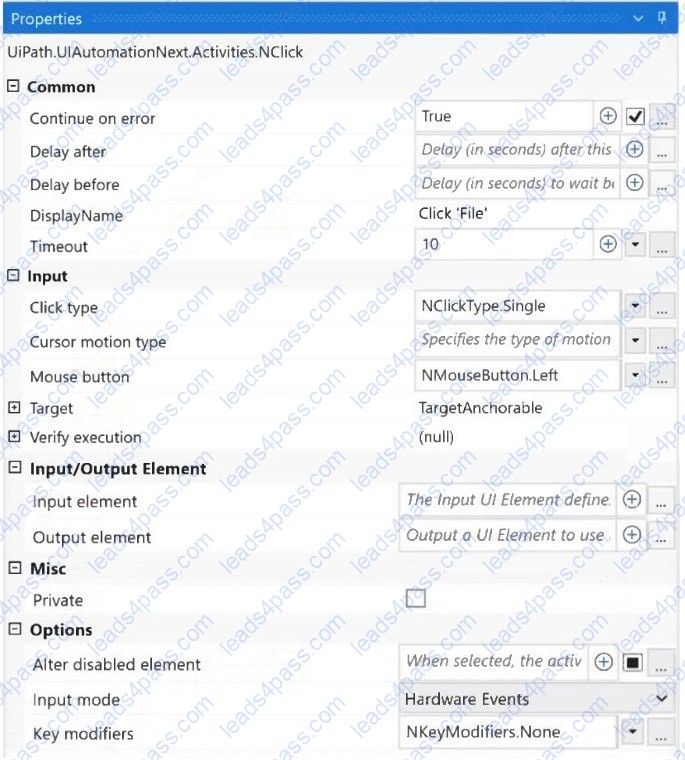
A. An exception is thrown after 10 milliseconds.
B. An exception is thrown after 10 seconds.
C. The next activity is executed after 10 seconds.
D. The next activity is executed after 10 milliseconds.





All rights are reserved by
leads4pass.com. Any changes, copy or trademarks abuse will be
regarded as infringement.
leads4pass.com will reserve the right to pursue accountability.
Copyright © 2004-
2026 leads4pass.com.