
NCM-MCI-5.15 Online Practice Questions and Answers
Over the period of 2 to 3 weeks, a cluster displays the following:
Periods where Warning Alerts of memory usage over 75% are asserted Periods where Critical Warnings of memory usage over 90% are asserted Periods of slow of frozen VDI desktops have caused work stoppage or slowdown VDI clones have periodically not powered up when called, causing work stoppage
Which steps should be used to prioritize the administrator's troubleshooting efforts?
A. Assess resource health on Hardware page Review the Analysis page for memory usage demand Determine the VDI workload-to-host affinity across the cluster
B. Analyze Alert Pages for a root cause of memory problem Analyze VM table page to access the VM functionality Analyze the VDI Clone properties for possible VDI Workload stress
C. Check Analysis page for CPU demand Verify VDI workload property for memory subscription Review the Hardware page to determine if the cluster has sufficient RAM
D. Review Analysis Page for memory use pattern Alert with VDI workload demand Analyze current and future workload in the Capacity Runaway tab for sufficient resources
An administrator is deploying several new application VMs to a Nutanix cluster. The application is very transactional with a 28/72 random, read/write ratio. What should the administrator do?
A. Add a minimum of four SSDs to each node to ensure all writes go to the SSDs.
B. Add a minimum of four virtual disks to each VM, and aggregate them on guest OS level.
C. Add one large SSD to each node and enable Flash Mode for the VMs.
D. Add one large virtual disk to each VM. and use it for all application data.

A VDI environment based on AHV Cluster is not performing well. The current environment is using only one bridge (Bridge0). The administrator needs to verify if nodes are using all network cards associated to Bridge0.
Which two menus should be used to check the current configuration? (Choose two.)
A. Network Configuration item in Settings menu
B. Host view in Network menu
C. Host NICs tab in Hardware menu
D. I/O Metrics tab in VM menu
For several days, an administrator notices the following alerts:
CVM NIC Speed Low Warning Alerts Warning Alerts of CVM NIC not performing at optimal speed CVM is disconnected from the network Critical Alert Network Visualization page shows excessive dropped packets on CVM/Host
Which steps should be taken to determine which problem should be addressed first?
A. Access the Hardware Page to verify resources are available Analyze ail CVM Speed Alerts in the Alerts/Events page Analyze output for the network and interface properties and connectivity issues
B. Verify Host/CVM connectivity on the Network Visualization page Use to verify the bridge and bond configuration Review alerts/events page for the CVM disconnected error
C. Review Alerts page for NIC speed alerts and alert timing Analyze the genesis.out log file for process failures
Assess the NIC properties in the Network Visualization>; Host Properties page
D. Restart networking services on the CVM Determine the current configuration of the affected CVM via output Access the Alerts/Events page for the CVM network connection failures
Refer to the exhibit.
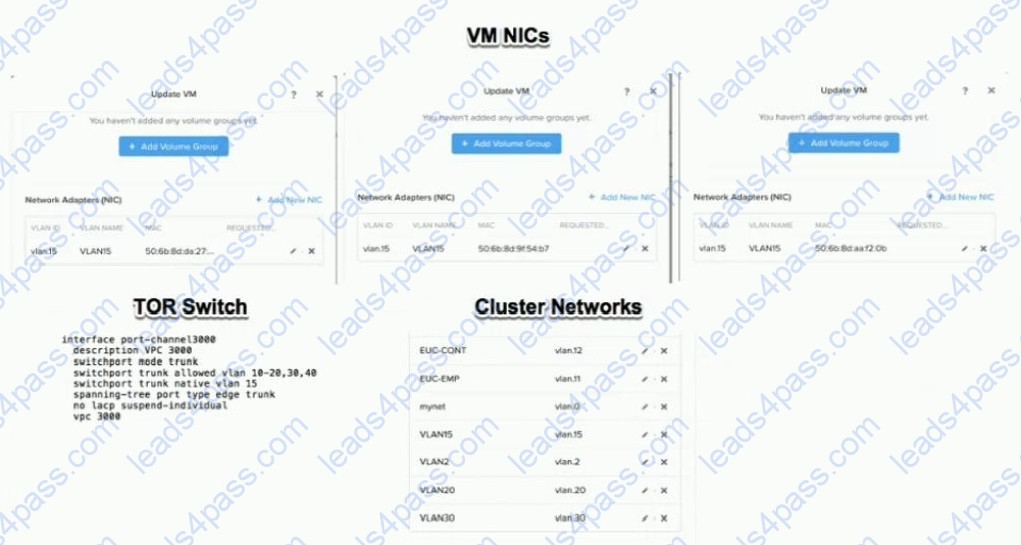
An administrator is commissioning a Nutanix Enterprise Cloud. Once the user VMs have been deployed and are running, the administrator finds that VMs on the same host are able to communicate, but are unable to communicate between hosts.
What must be changed to enable full inter-VM communications?
A. Change the network the VMs are connected to
B. Change the spanning-tree port type on the switch
C. The VMs need to have static IP addresses
D. Update the switch to specifically allow VLAN 15

A guest VM is reported to have poor storage performance. It has an I/O profile of 80% read. 20% write, and the HDDs form more than 50% of the read source. What should an administrator do to resolve this issue?
A. Increase SSD capacity
B. Increase the OPLOG
C. Increase the write cache
D. Use HDDs with higher RPM
Refer to the exhibit.
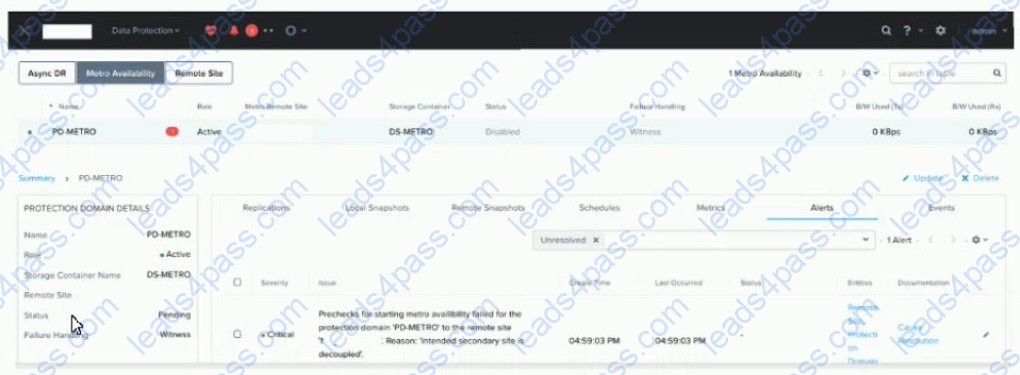
An administrator notices a critical alert on the Metro Availability Protection Domain What is causing this alert?
A. Metro Availability Protection domain is active on the remote site.
B. VMware Site Recovery Manager is handling a failover event
C. Metro Availability did not fail over and caused an outage.
D. vSphere moved VMs to the remote container, and the VMs must be moved back.
Refer to the exhibit.
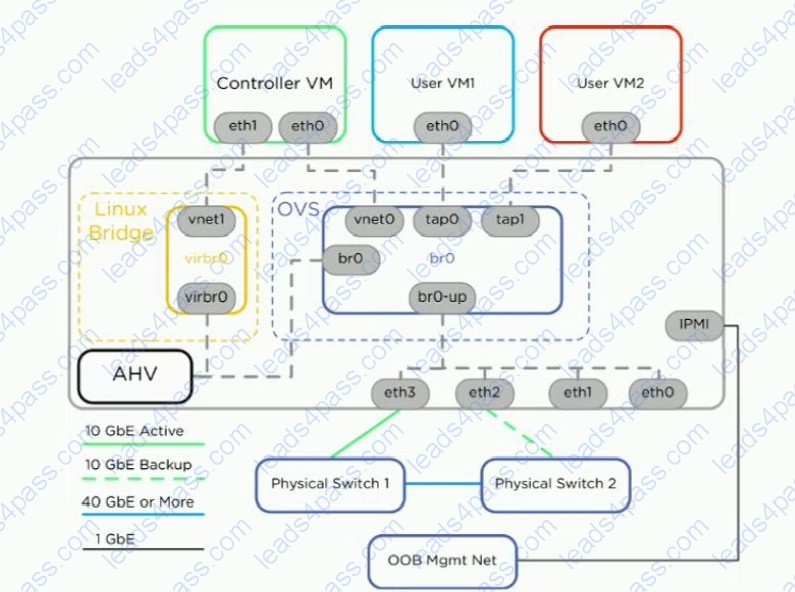
A Nutanix host is connected as shown in the exhibit with br0-up set to active/backup. Physical Switch 1 experiences a power outage causing br0-up to failover to using eth2. The CVM and host become inaccessible. User VMs restart on other hosts in the cluster, which causes a disruption to those VMs.
Which configuration issue likely caused this outage?
A. Bridge br0-up should be configured to use balance-tcp rather than active/backup.
B. The CVM should have eth1 connected to the OVS.
C. The upstream port for eth2 is missing a VLAN.
D. The user VMs only have one NIC
An alert about RX errors on eth2 on a node is reported in the cluster. The administrator logs in to the CVM in question, checks the ping_* files in the data/logs/syststats folder, and notices intermittent ping loss. The node in question has the following network configuration:
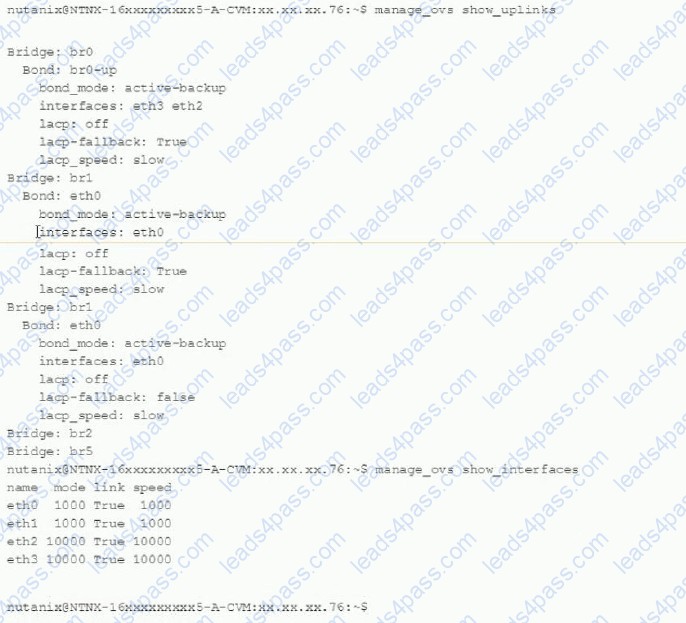
Which action should be used to troubleshoot without disrupting the VMs running on this node?
A. Replace the cable from eth2 to the switch
B. Remove eth3 from br0-up and monitor for new alerts
C. Check the port on the switch side for any errors
D. Enable balance-s1b on br0-up and monitor if a problem persists
A customer wants to run SAP HANA on a Nutanix cluster with the following characteristics:
AHV nodes SAP HANA version 2 Production database files
Which configuration should be recommended to the customer?
A. Start with a cluster containing three or more nodes
B. Enable only compression for the container that contains the Production database
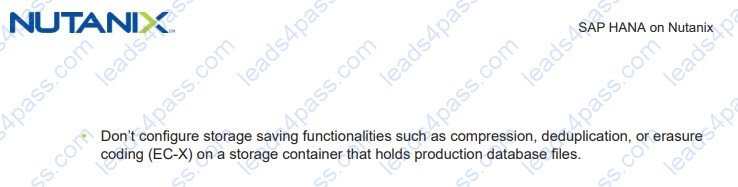
C. Do not enable compression, deduplication. or erasure coding on the storage container
D. Plate the SAP HANA Database on the same socket as CVM





All rights are reserved by
leads4pass.com. Any changes, copy or trademarks abuse will be
regarded as infringement.
leads4pass.com will reserve the right to pursue accountability.
Copyright © 2004-
2026 leads4pass.com.