
MD-102 Online Practice Questions and Answers
You have a Microsoft 365 E5 subscription that contains 500 macOS devices enrolled in Microsoft Intune.
You need to ensure that you can apply Microsoft Defender for Endpoint antivirus policies to the macOS devices. The solution must minimize administrative effort.
What should you do?
A. Onboard the macOS devices to the Microsoft Purview compliance portal.
B. From the Microsoft Intune admin center, create a security baseline.
C. Install Defender for Endpoint on the macOS devices.
D. From the Microsoft Intune admin center, create a configuration profile.
Note: This question is part of a series of questions that present the same scenario. Each question in the series contains a unique solution that might meet the stated goals. Some question sets might have more than one correct solution, while
others might not have a correct solution.
After you answer a question in this section, you will NOT be able to return to it. As a result, these questions will not appear in the review screen.
Your company has an Azure AD tenant named contoso.com that contains several Windows 10 devices.
When you join new Windows 10 devices to contoso.com, users are prompted to set up a four-digit pin.
You need to ensure that the users are prompted to set up a six-digit pin when they join the Windows 10 devices to contoso.com.
Solution: From the Microsoft Entra admin center, you configure automatic mobile device management (MDM) enrollment. From the Microsoft Intune admin center, you create and assign a device restrictions profile.
Does this meet the goal?
A. Yes
B. No
You have a Microsoft 365 subscription that uses Microsoft Intune Suite.
You use Microsoft Intune to manage devices. All devices are in the same time zone.
You create an update rings policy and assign the policy to all Windows devices.
On the November 1, you pause the update rings policy.
All devices remain online.
Without further modification to the policy, on which date will the devices next attempt to update?
A. December 1
B. December 6
C. November 15
D. November 22
You have a Microsoft 365 tenant that contains the objects shown in the following table.
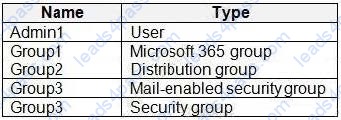
In the Microsoft Intune admin center, you are creating a Microsoft 365 Apps app named App1.
To which objects can you assign App1?
A. Group3 and Group4 only
B. Admin1, Group3, and Group4 only
C. Group1, Group3, and Group4 only
D. Group1, Group2, Group3, and Group4 only
E. Admin1, Group1, Group2, Group3, and Group4
You are implementing Microsoft Intune Suite.
You enroll devices in Intune as shown in the following table.
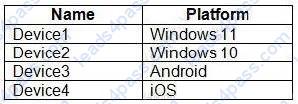
The performance of which devices can be analyzed by using Endpoint analytics?
A. Device1 only
B. Device1 and Device2 only
C. Device1, Device2, and Device3 only
D. Device1, Device2, and Device4 only
E. Device1, Device2, Device3, and Device4
You have a computer named Computed that has Windows 10 installed.
You create a Windows PowerShell script named config.psl.
You need to ensure that config.psl runs after feature updates are installed on Computer5.
Which file should you modify on Computer5?
A. LiteTouch.wsf
B. SetupConfig.ini
C. Unattendb*
D. Unattend.xml
HOTSPOT
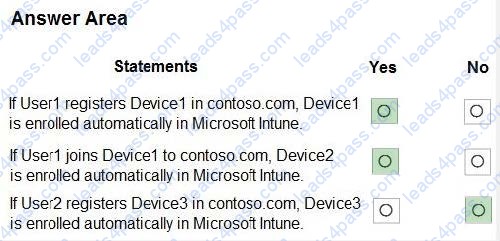
You have an Azure AD tenant named contoso.com that contains the users shown in the following table.

For contoso.com, the Mobility (MDM and MAM) settings have the following configurations:
MDM user scope: Group1 MAM user scope: Group2 You purchase the devices shown in the following table:
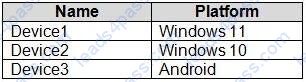
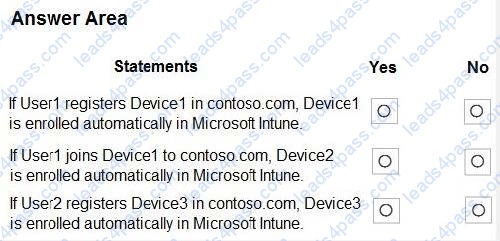
For each of the following statements, select Yes if the statement is true. Otherwise, select No.
Hot Area:
HOTSPOT
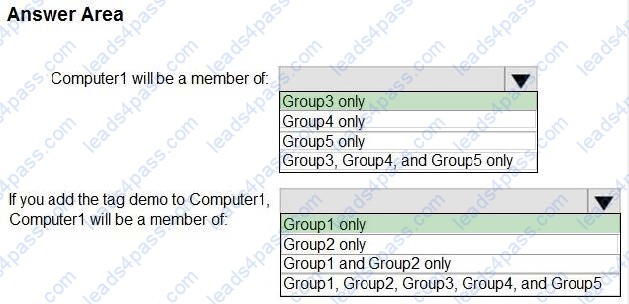
Your company uses Microsoft Defender for Endpoint. Microsoft Defender for Endpoint includes the device groups shown in the following table.
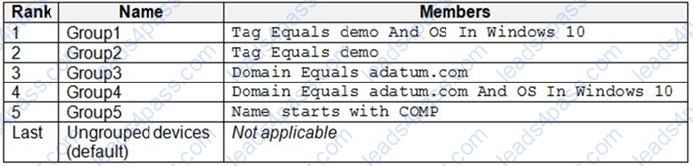
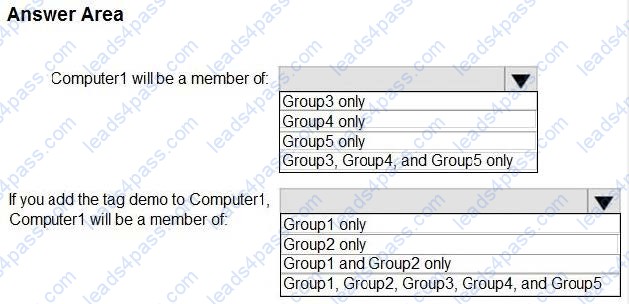
You onboard a computer to Microsoft Defender for Endpoint as shown in the following exhibit.
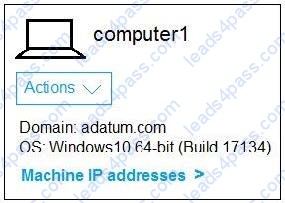
What is the effect of the Microsoft Defender for Endpoint configuration? To answer, select the appropriate options in the answer area. NOTE: Each correct selection is worth one point.
Hot Area:
HOTSPOT
You have a Microsoft 365 subscription.
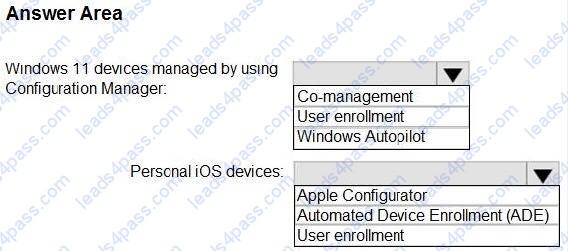
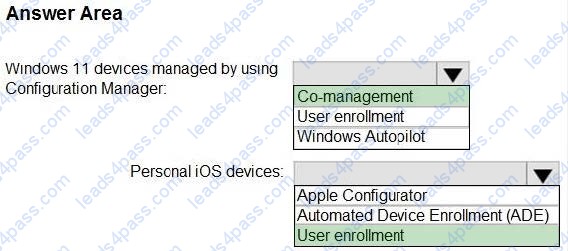
You plan to enable Microsoft Intune enrollment for the following types of devices:
1.
Existing Windows 11 devices managed by using Configuration Manager
2.
Personal iOS devices
The solution must minimize user disruption.
Which enrollment method should you use for each device type? To answer, select the appropriate options in the answer area.
NOTE: Each correct selection is worth one point.
Hot Area:
DRAG DROP
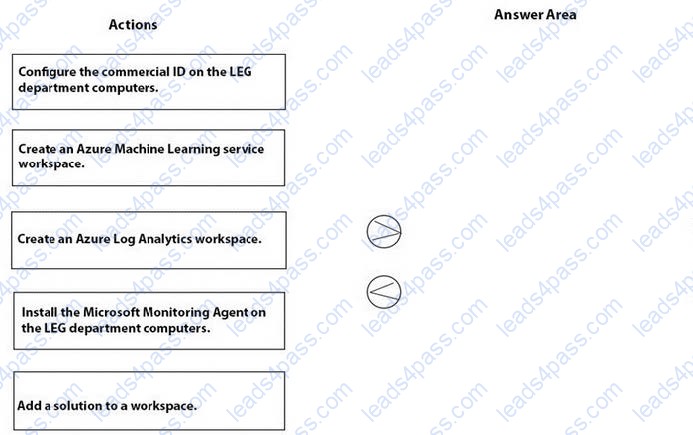
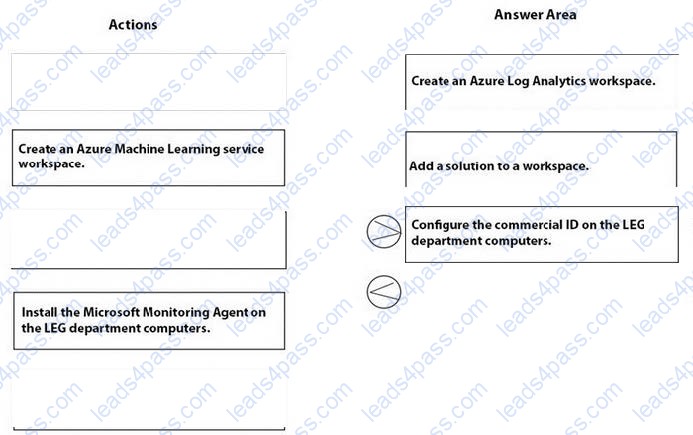
You need to meet the technical requirements for the LEG department computers.
Which three actions should you perform in sequence? To answer, move the appropriate actions from the list of actions to the answer area and arrange them in the correct order.
Select and Place:





All rights are reserved by
leads4pass.com. Any changes, copy or trademarks abuse will be
regarded as infringement.
leads4pass.com will reserve the right to pursue accountability.
Copyright © 2004-
2026 leads4pass.com.