
MB-800 Online Practice Questions and Answers
DRAG DROP
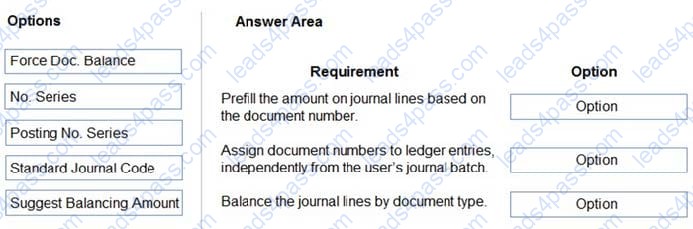
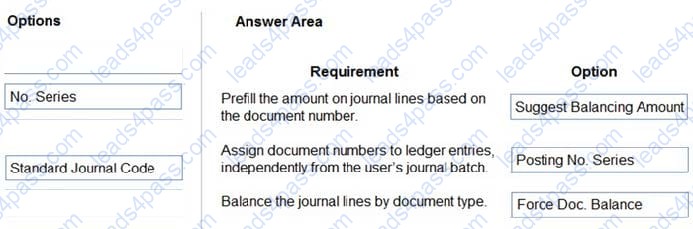
You are setting up the general journals and batches for an accounting department.
The accounting department has multiple users who will work simultaneously within different general journals.
You need to set up the different journal templates and batches for each user according to the company's requirements.
Which options should you use? To answer, drag the appropriate options to the correct requirements. Each option may be used once, more than once, or not at all. You may need to drag the split bar between panes or scroll to view content.
NOTE: Each correct selection is worth one point.
Select and Place:
DRAG DROP
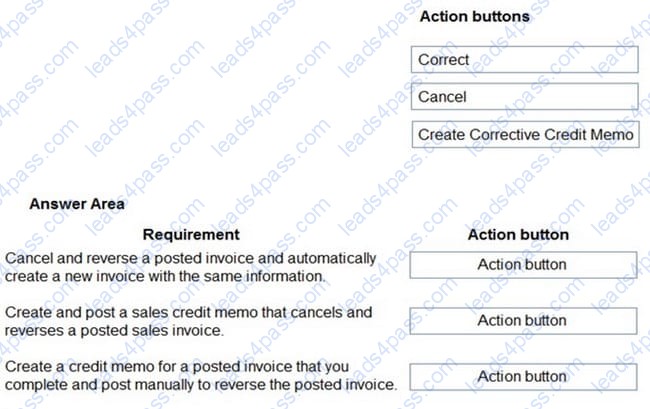
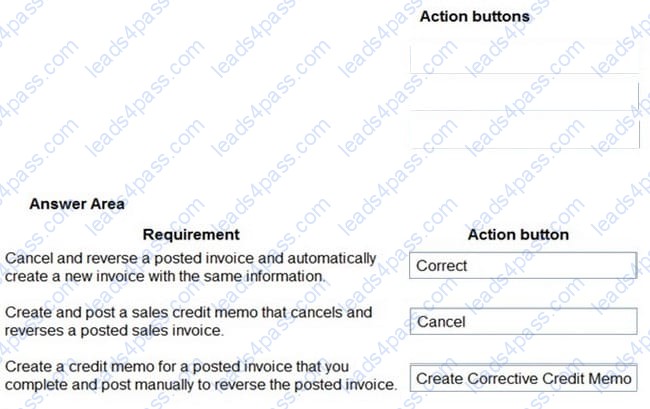
You are performing actions on posted sales invoices.
You need to correct any identified errors.
Which actions should you perform? To answer, drag the action buttons to the correct requirements. Each action button may be used once, or not at all. You may need to drag the split bar between panes or scroll to view content.
NOTE: Each correct selection is worth one point.
Select and Place:
HOTSPOT A company uses Dynamics 365 Business Central. There are three departments (ADM, PROD and SALES) that are set up as dimensions. A customer wants to speed up the purchase invoice entry process for building materials by having the AP clerks fill purchase invoices without using dimensions. Monthly building expenses can vary between $5,000-$7,000 per month. The
allocation of building expenses is as follows:
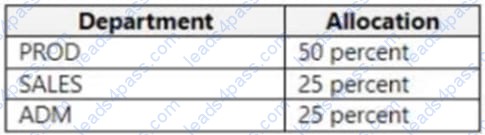
Allocation of the monthly building expense between dimensions is required at the end of each month.
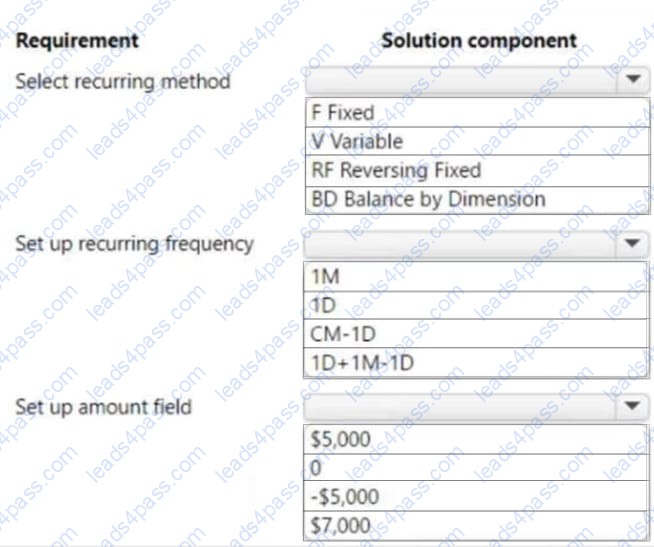
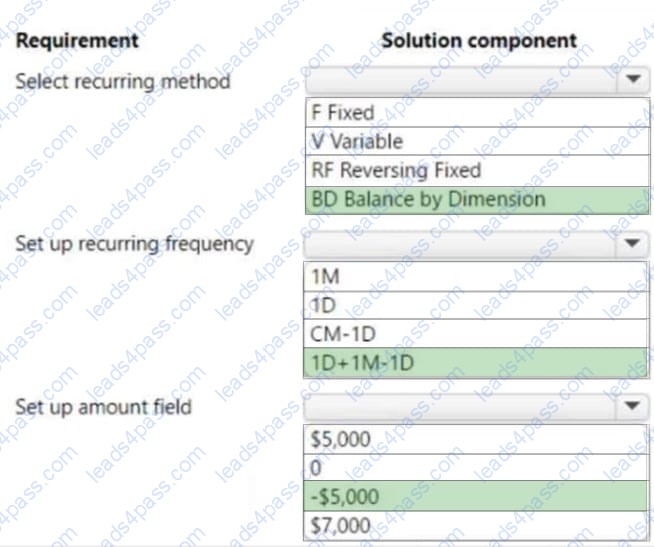
You need to configure the system to automatically allocate building expense total balances each month between dimensions.
How should you configure recurring general journals? To answer, select the appropriate options in the answer area.
NOTE: Each correct selection is worth one point.
Hot Area:
A company purchases items by using cash. You register a vendor payment when you a post a purchase invoice for a cash vendor.
You are creating a new cash vendor.
You need to set up the vendor so that payments post automatically when you post a purchase invoice.
Which type of setup should you use?
A. Payment Method as Cash
B. Payment Term as COD
C. Payment Method as Cash with balancing account
D. Prepayment
A company plans to verify that purchase invoices use agreed-upon prices and discounts.
The company is configuring settings on a vendor card. The company receives a validation error when creating a purchase order for the vendor.
You need to find out which setting is causing the validation error.
Which configuration option on the vendor card must you populate?
A. Order address
B. Location code
C. Vendor Template
D. Purchase Prices
E. Vendor Posting Group
A company is negotiating with a vendor for better prices on several items. The company has made late payments to the vendor in the past.
You need to configure the system to help ensure that all future payments will be made on time.
What should you do?
A. Set the vendor's Priority field to 0 and create a workflow for generating vendor payments.
B. Set the vendor's Priority field to 1 and enable the Late Payment Predictions extension.
C. Set the vendor's Priority field to 1 and run the Suggest Vendor Payments process.
D. Set the Application Method to Apply to Oldest and run the Suggest Vendor Payments process.
E. Set the vendor's Priority field to 0 and run the Suggest Vendor Payments process.
A company uses Dynamics 365 Business Central. You manage customer master data for the company.
You need to create new customers.
What are three possible ways to achieve the goal? Each correct answer presents a complete solution.
NOTE: Each correct selection is worth one point.
A. On the Contacts page, select Related Information and then select Customer.
B. On the Contacts page, select Create as Customer.
C. On the Configuration Template Header for the customer table, select Create Instance.
D. On the Customers page, select New.
E. On the Customer card, select Apply Template.
After you answer a question in this section, you will NOT be able to return to it. As a result, these questions will not appear in the review screen.
You are configuring default reports and layouts in Dynamics 365 Business Central.
You must add new data items to the report and change the layout associated with the default Purchase Order report.
A developer creates and deploys a new report object that includes the new data items and layout.
You need to configure Business Central to use the new report object as the system default when printing purchase orders.
Solution: On the Report Layout Selection page, select the new report object. Update the value to Custom Layout and select the updated layout.
Does the solution meet the goal?
A. Yes
B. No
A company uses Dynamics 365 Business Central.
You need to ensure that sales invoice discounts are calculated automatically.
What should you configure?
A. Discount Posting setting on the Sales and Receivables Setup page
B. Calc. Inv. Discount setting on the Sales and Receivables Setup page
C. Calc. Inv. Discount setting on the Purchase and Payables Setup page
D. Show Amounts setting on the General Ledger Setup page
A company uses Dynamics 365 Business Central.
An accountant must post sales services in a journal by using a predefined alphanumeric sequence. The accountant is using multiple general journal batches.
You need to configure invoice numbers for the journal.
Which two fields should you populate? Each correct answer presents part of the solution.
NOTE: Each correct selection is worth one point.
A. Posting No. Series field in General Journal Templates
B. No. Series field in General Journal Batches
C. No. Series field in General Journal Templates
D. Posting No. Series field in General Journal Batches





All rights are reserved by
leads4pass.com. Any changes, copy or trademarks abuse will be
regarded as infringement.
leads4pass.com will reserve the right to pursue accountability.
Copyright © 2004-
2026 leads4pass.com.