
EX300 Online Practice Questions and Answers
SIMULATION
RHCE Test Configuration Instructions
Information for the two systems you will use in test is the following:
system1.group3.example.com: is one of the main sever. system2.group3.example.com: mainly used as a client.
Password for both of the two systems is atenorth
System's IP is provided by DHCP, you can regard it as normal, or you can reset to Static IP in accordance with the following requirements:
system1.group3.example.com: 172.24.3.5system2.group3.example.com: 172.24.3.10
The subnet mask is 255.255.255.0
Your system is a member of DNS domain group3.example.com. All systems in DNS domain group3.example.com are all in subnet 172.24.3.0/255.255.255.0, the same all systems in this subnet are also in group3.example.com, unless specialized, all network services required to be configured can be accessed by systems of domain group3.
host.group3.example.com provides a centralized authentication service domain GROUP3.EXAMPLE.COM, both system1 and system2 have already been pre-configured to be the client
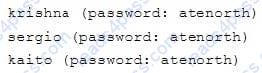
for this domain, this domain provides the following user account:
Firewall is enabled by default, you can turn it off when deemed appropriate, other settings about firewall may be in separate requirements.
Your system will be restarted before scoring, so please ensure that all modifications and service configurations you made still can be operated after the restart without manual intervention, virtual machine instances of all examinations must be able to enter the correct multi-user level after restart without manual assistance, it will be scored zero if the test using virtual machine system cannot be restarted or be properly restarted.
Corresponding distribution packages for the testing using operating system Red Hat Enterprise Linux version can be found in the following link: http://server1.group3.example.com/rhel
Part of the requirements include host security, ensure your host security limit does not prevent the request to allow the host and network, although you correctly configured the network service but would have to allow the host or network is blocked, this also does not score.
You will notice that some requirements which clearly do not allow services be accessed by service domain my133t.org, systems of this domain are in subnet 172.25.1.0/252.255.255.0, and systems of these subnets also belong to my 133t.org domain.
PS: Notice that some test questions may depend on other exam questions, for example, you might be asked to perform a series of restrictions on a user, but this user creation may be required in other questions. For convenient identification, each exam question has some radio buttons to help you identify which questions you have already completed or not completed. Certainly, you do not need to care these buttons if you don't need them.
Create a script
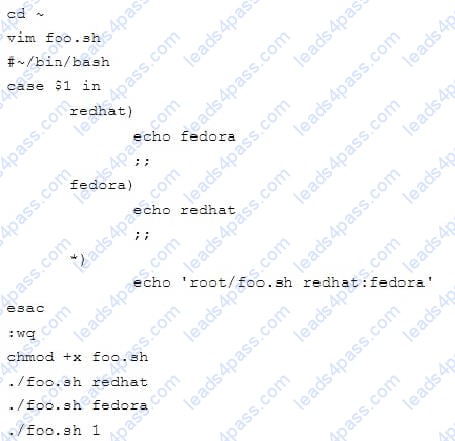
Create a script named /root/foo.sh on the system1, make it provide the following characteristics:
1.
When running /root/foo.sh redhat, the output is fedora
2.
When running /root/foo.sh fedora, the output is redhat
3.
When there is no parameter or parameter is not redhat or fedora, the following information will be
generated by the error output: /root/foo.sh redhat:fedora
SIMULATION
RHCE Test Configuration Instructions
Information for the two systems you will use in test is the following:
system1.group3.example.com: is one of the main sever. system2.group3.example.com: mainly used as a client.
Password for both of the two systems is atenorth
System's IP is provided by DHCP, you can regard it as normal, or you can reset to Static IP in accordance with the following requirements:
system1.group3.example.com: 172.24.3.5system2.group3.example.com: 172.24.3.10
The subnet mask is 255.255.255.0
Your system is a member of DNS domain group3.example.com. All systems in DNS domain group3.example.com are all in subnet 172.24.3.0/255.255.255.0, the same all systems in this subnet are also in group3.example.com, unless specialized, all network services required to be configured can be accessed by systems of domain group3.
host.group3.example.com provides a centralized authentication service domain GROUP3.EXAMPLE.COM, both system1 and system2 have already been pre-configured to be the client
for this domain, this domain provides the following user account:
Firewall is enabled by default, you can turn it off when deemed appropriate, other settings about firewall may be in separate requirements.
Your system will be restarted before scoring, so please ensure that all modifications and service configurations you made still can be operated after the restart without manual intervention, virtual machine instances of all examinations must be able to enter the correct multi-user level after restart without manual assistance, it will be scored zero if the test using virtual machine system cannot be restarted or be properly restarted.
Corresponding distribution packages for the testing using operating system Red Hat Enterprise Linux version can be found in the following link: http://server1.group3.example.com/rhel
Part of the requirements include host security, ensure your host security limit does not prevent the request to allow the host and network, although you correctly configured the network service but would have to allow the host or network is blocked, this also does not score.
You will notice that some requirements which clearly do not allow services be accessed by service domain my133t.org, systems of this domain are in subnet 172.25.1.0/252.255.255.0, and systems of these subnets also belong to my 133t.org domain.
PS: Notice that some test questions may depend on other exam questions, for example, you might be asked to perform a series of restrictions on a user, but this user creation may be required in other questions. For convenient identification, each exam question has some radio buttons to help you identify which questions you have already completed or not completed. Certainly, you do not need to care these buttons if you don't need them.
Configure iSCSI Clients
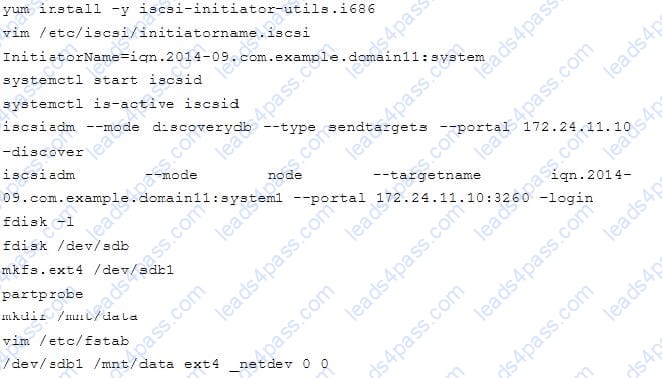
Configure the system2 to make it can link to iqn.2014-09.com.example.domain11:system1
provided by the system, meet the following requirements at the same time:
1. iSCSI device automatically loads during the system start-up.
Block device iSCSI contains a 2100MIB partition, and is formatted as ext4.
This partition mount to the /mnt/data and mount automatically during the system start-up.
SIMULATION
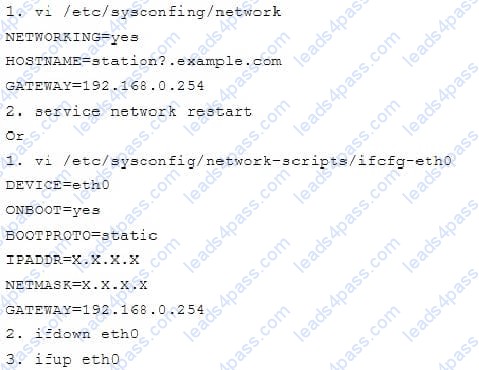
There are two different networks 192.168.0.0/24 and 192.168.1.0/24. Where 192.168.0.254 and
192.168.1.254 IP Address are assigned on Server. Verify your network settings by pinging 192.168.1.0/24 Network's Host.
SIMULATION
Make Secondary belongs the jeff and marion users on sysusers group. But harold user should not belongs to sysusers group.
SIMULATION
Make on /storage directory that only the user owner and group owner member can fully access.
SIMULATION
There were two systems:
system1, main system on which most of the configuration take place
system2, some configuration here
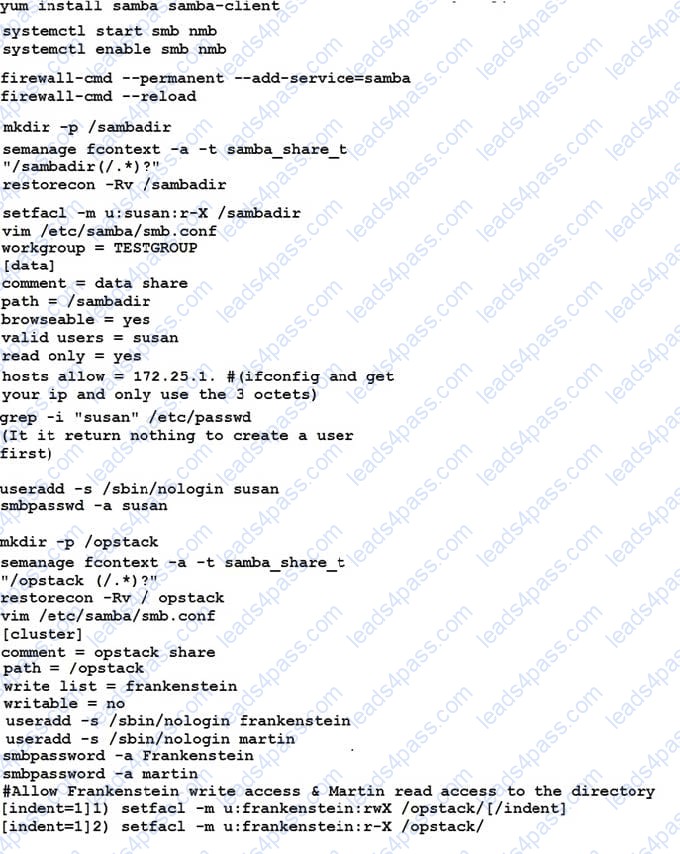
Configure smb access.
Share the /sambadir directory via SMB on serverX
Your SMB server must be a member of the TESTGROUP workgroup
The share name must be data
The data share must be available to example.com domain clients only
The data share must be browseable
susan must have read access to the share, authenticating with the same password “password”, if necessary
Configure the serverX to share /opstack with SMB share name must be cluster
The user frankenstein has readable, writeable, accessable to the /opstack SMB share
Both users should have the SMB passwd “SaniTago”
SIMULATION
There were two systems:
system1, main system on which most of the configuration take place
system2, some configuration here
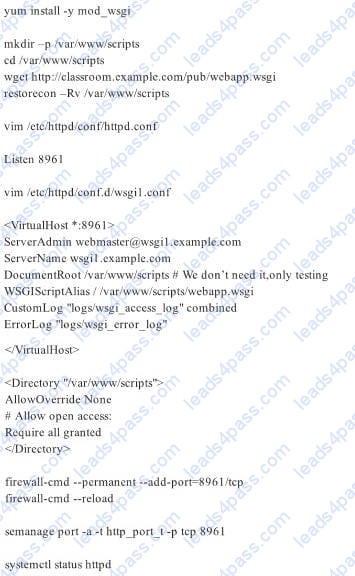
Dynamic Webpage Configuration.
Configure website http://wsgiX.example.com:8961 on system1 with the documentroot /var/www/scripts
Site should execute webapp.wsgi
Page is already provided on http://classroom.example.com/pub/webapp.wsgi
Content of the script should not be modified

SIMULATION
There were two systems:
system1, main system on which most of the configuration take place
system2, some configuration here
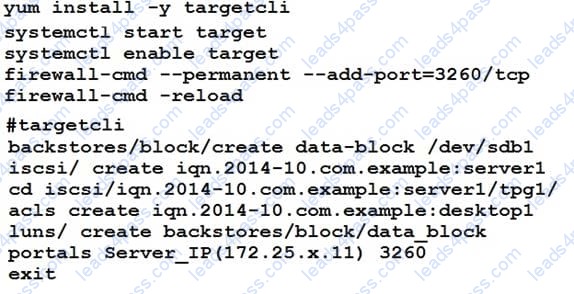
Configure SCSI storage.
Create a new 1 GB target on your serverX.example.com
The block device name should be data_block
The server should export an iscsi disk called iqn.2014-10.com.example:serverX
This target should only be allowed to desktop





All rights are reserved by
leads4pass.com. Any changes, copy or trademarks abuse will be
regarded as infringement.
leads4pass.com will reserve the right to pursue accountability.
Copyright © 2004-
2026 leads4pass.com.