
AZ-140 Online Practice Questions and Answers
You have the devices shown in the following table.
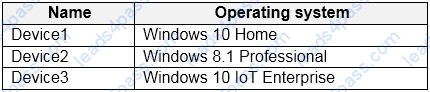
You plan to deploy Windows Virtual Desktop for client access to remove virtualized apps. Which devices support the Remote Desktop client?
A. Device1 and Device2 only
B. Device1 and Device3 only
C. Device1, Device2, and Device3
D. Device1 only
You have a Windows Virtual Desktop host pool that contains 20 Windows 10 Enterprise multi-session hosts.
Users connect to the Windows Virtual Desktop deployment from computers that run Windows 10.
You plan to implement FSLogix Application Masking.
You need to deploy Application Masking rule sets. The solution must minimize administrative effort.
To where should you copy the rule sets?
A. the FSLogix profile container of each user
B. C:\Program Files\FSLogix\Apps\Rules on every Windows 10 computer
C. C:\Program Files\FSLogix\Apps\Rules on every session host
After you answer a question in this section, you will NOT be able to return to it. As a result, these questions will not appear in the review screen.
You have an Azure Virtual Desktop host pool named Pool1 that is integrated with an Azure Active Directory Domain Services (Azure AD DS) managed domain.
You need to configure idle session timeout settings for users that connect to the session hosts in Pool1.
Solution: From the Azure portal, you modify the Advanced settings in the RDP Properties of Pool1.
Does this meet the goal?
A. Yes
B. No
You have an Azure Virtual Desktop deployment.
You implement FSLogix profile containers.
You need to ensure that the FSLogix profile containers are not used for specific users.
What should you do?
A. Modify the local groups on each session host
B. Apply an Application Masking rule to each session host
C. Apply an AppLocker policy to each session host
D. Modify the RDP Properties of the host pool
HOTSPOT
You create an Azure Virtual Desktop host pool as shown in the following exhibit.
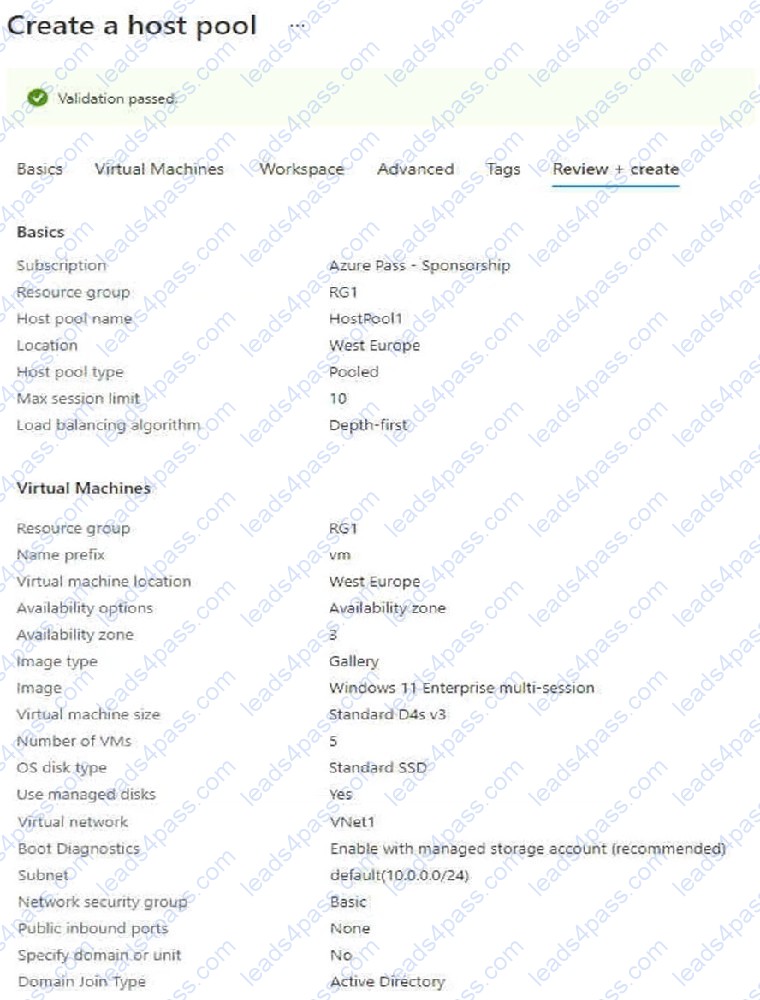
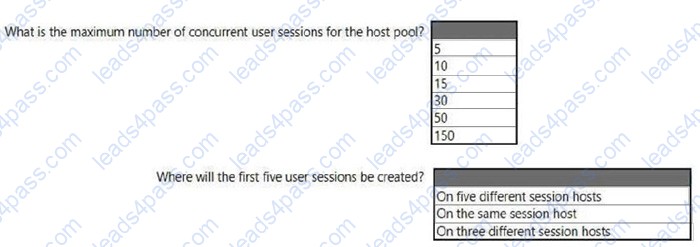
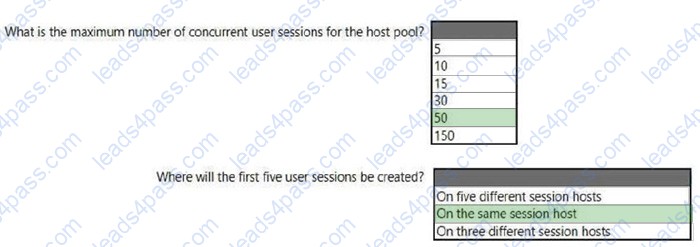
Use the drop-down menus to select the answer choice that answers each question based on the information presented in the graphic. NOTE: Each correct selection is worth one point.
Hot Area:
HOTSPOT
You have an Azure Virtual Desktop deployment that contains two users named User1 and User2 and the storage accounts shown in the following table.

The File share settings for storage1 are configured as shown in the following exhibit.
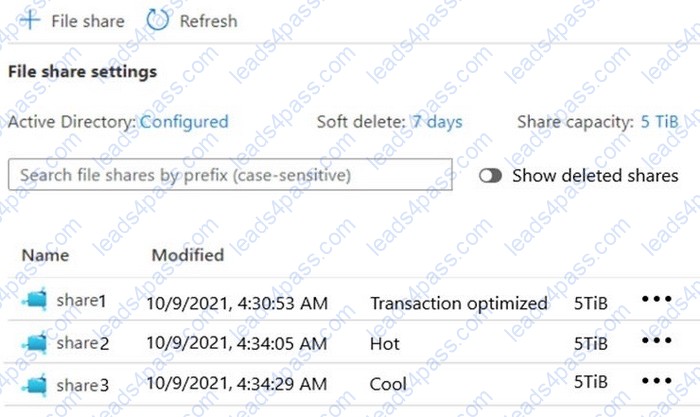
The File share settings for storage2 are configured as shown in the following exhibit.
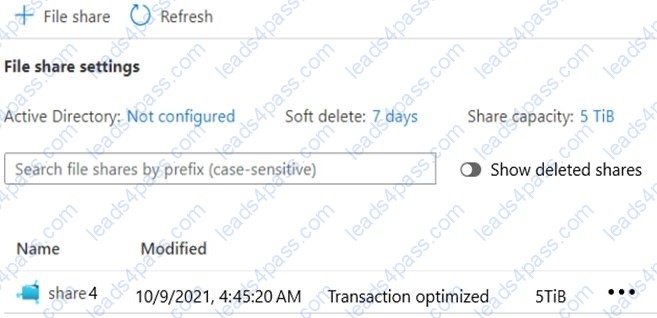
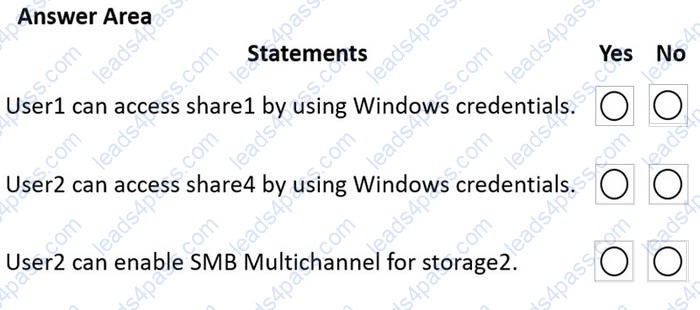
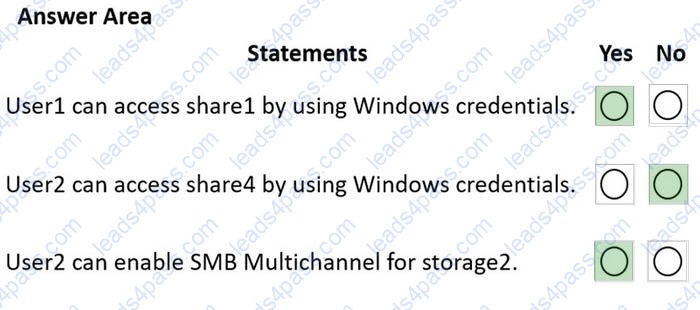
For each of the following statements, select Yes if the statement is true. Otherwise, select No. NOTE: Each correct selection is worth one point.
Hot Area:
HOTSPOT
You have an Azure subscription that contains an Azure Virtual Desktop deployment. The deployment contains 25 session hosts.
You create two storage accounts as shown in the following table.
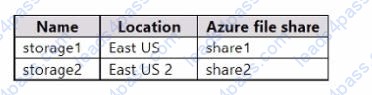
The storage accounts store Azure Virtual Desktop user profile data.
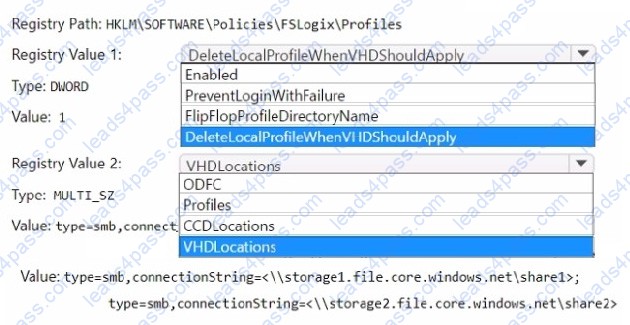
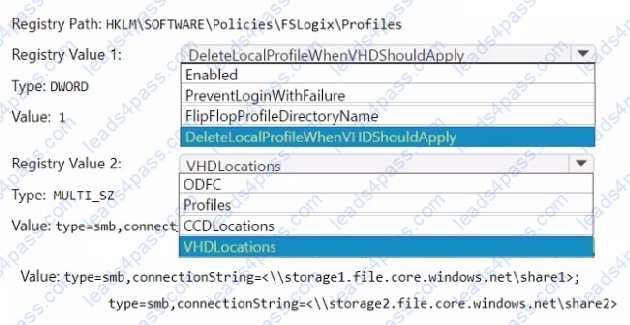
You plan to deploy FSLogix user Profile Containers that will use Cloud Cache.
You need to configure the FSLogix registry settings for each session host.
How should you complete the registry settings? To answer, select the appropriate options in the answer area.
NOTE: Each correct selection is worth one point.
Hot Area:
HOTSPOT
You have an Azure subscription that contains the storage accounts shown in the following table.
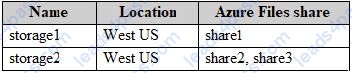
The subscription contains the vaults shown in the following table.
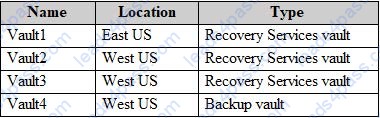
The subscription contains the Azure Virtual Desktop host pools shown in the following table.
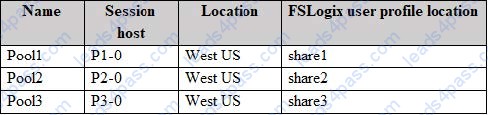
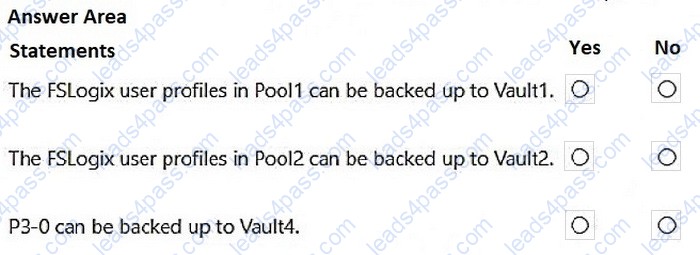
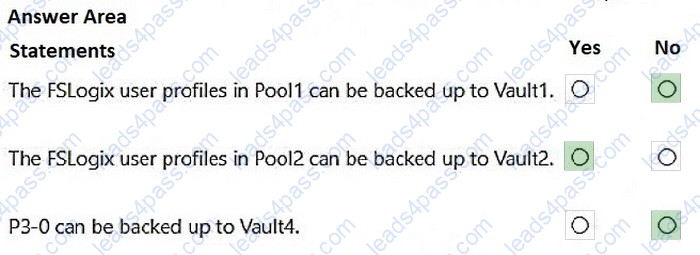
For each of the following statements, select Yes if the statement is true. Otherwise, select No. NOTE: Each correct selection is worth one point.
Hot Area:
HOTSPOT
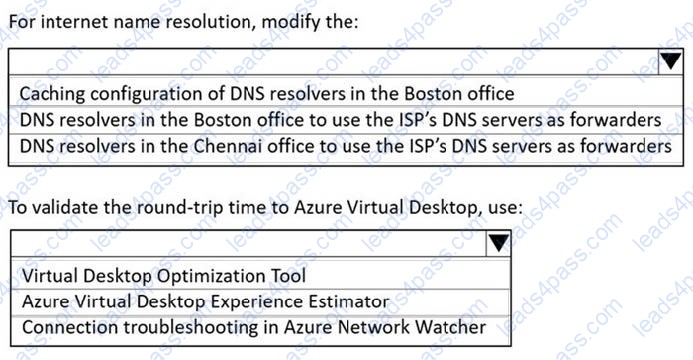
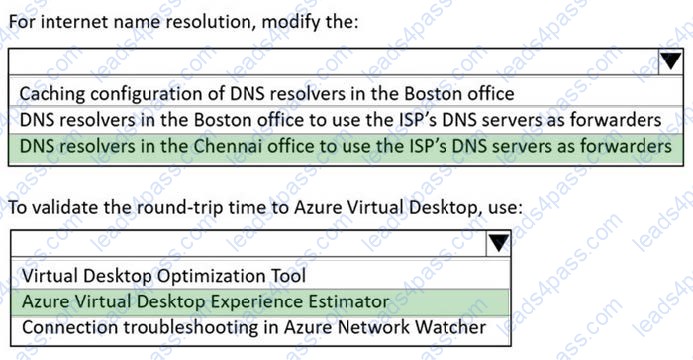
You need to recommend a DNS infrastructure that meets the performance requirements.
What should you recommend? To answer, select the appropriate options in the answer area.
NOTE: Each correct selection is worth one point.
Hot Area:
HOTSPOT
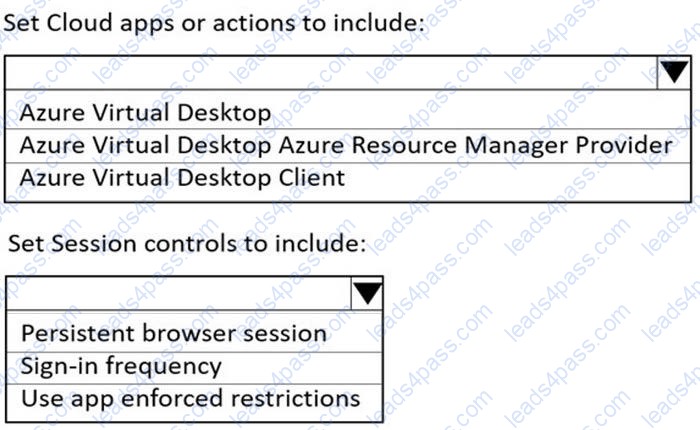
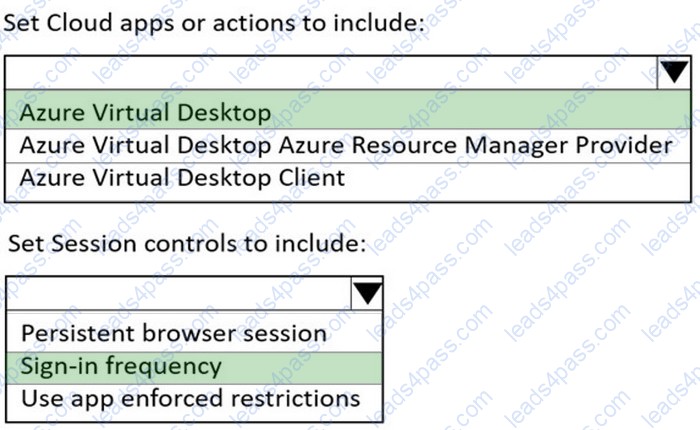
You need to configure a conditional access policy to meet the authentication requirements.
What should you include in the policy configuration? To answer, select the appropriate options in the answer area.
NOTE: Each correct selection is worth one point.
Hot Area:





All rights are reserved by
leads4pass.com. Any changes, copy or trademarks abuse will be
regarded as infringement.
leads4pass.com will reserve the right to pursue accountability.
Copyright © 2004-
2026 leads4pass.com.