
A00-260 Online Practice Questions and Answers
The ability to deploy a SAS Data Integration Studio job as a Web service or a SAS Stored Process requires additional set up that is performed in which client application?
A. SAS Data Integration Studio
B. SAS Enterprise Guide
C. SAS Job Deployment Studio
D. SAS Management Console
Which statement correctly defines a System DSN?
A. Not specific to an individual user. Anyone with permission to access the data source can use it.
B. Specific to an individual user. It is available only to the user who creates it.
C. Not specific to an individual user. It can be shared among users even though it is created locally.
D. Specific to an individual user. But it can be shared among users.
In the following display, can status handling be enabled for both the Extract transformation and the Sort transformation?
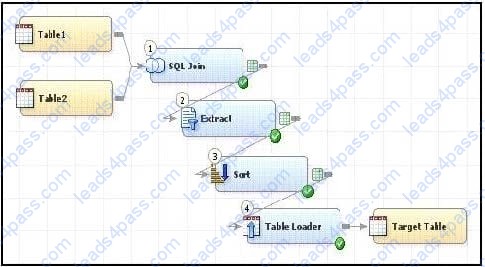
A. Yes. The Return Code Check transformation can be added to the job flow immediately following the Sort transformation - the Status Handling tab in this Return Code Check transformation properties can then establish the desired status handling for both the Extract and Sort transformations.
B. No. Both the Extract and the Sort transformations do not have a Status Handling tab in their corresponding properties window, therefore it is not possible to establish status handling for these transformations.
C. Yes. The Return Code Check transformation can be added to the job flow twice, once immediately following the Extract, and again immediately following the Sort - the Status Handling tab in each of the Return Code Check transformations properties can then establish the desired status handling.
D. Yes. The status handling tab in the job properties window will allow you to select which transformation (or even several transformations) that you want to define status handling for.
When writing postcode in the Precode and Postcode tab of the Transpose transformation in SAS Data Integration Studio, which symbol allows you to reference the transformation output table regardless of the actual physical name for that target table?
A. andsyslast
B. syslast
C. andtarget
D. %target
In the following display, can status handling be enabled for the Extract transformation?
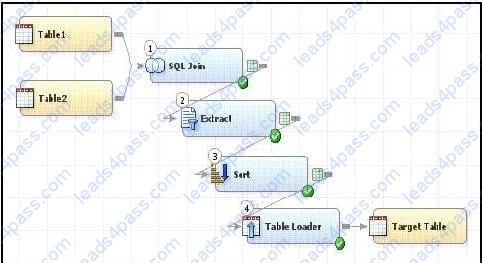
A. No. The Extract transformation does not have a status handling tab in its Properties window, and the Return Code Check transformation can only provide status handling at the job level.
B. Yes. The Return Code Check transformation can be added to the END of the job flow - the Status Handling tab in the Return Code Check transformation properties can then establish the desired status handling.
C. No. The Extract transformation does not have a Status Handling tab in its Properties window, therefore it is not possible to establish status handling for this transformation.
D. Yes. The Return Code Check transformation can be added to the job flow immediately following the Extract - the Status Handling tab in the Return Code Check transformation properties can then establish the desired status handling.
Assume that SAS Data Integration Studio Table Loader is being used in a job. The load style selected is Update/Insert. Which statement is true regarding theAssume that SAS Data Integration Studio? Table Loader is being used in a job. The load style selected is Update/Insert. Which statement is true regarding the relationship between the source table and the target table?
A. From the source table, matching rows are updated in the target table and new rows are added.
B. From the source table, matching rows AND new rows are added, but the original matching row in the target table is marked as inactive.
C. From the source table, matching rows are skipped, and new rows are added.
D. A or C, depending on further options chosen.
How do you enable performance statistics for a SAS Data Integration Studio job?
A. Define Collect Runtime Statistics on the SAS Data Integration Studio job.
B. Define Collect Table Statistics on the SAS Data Integration Studio job.
C. Define Collect Diagnostics on the SAS Data Integration Studio job.
D. Define Collect Table Statistics on the SAS Data Integration Studio options.
Within SAS Data Integration Studio's SQL Join transformation, the Validate Expression button is located in:
A. a Where clause definition
B. an Expression Builder window
C. a field Expression definition
D. a Subquery definition
When exporting a SAS package file using SAS Data Integration Studio, where can it be saved?
A. in metadata
B. on any machine that SAS Data Integration Studio can write to
C. in a SAS catalog
D. only on the machine where SAS Data Integration Studio is running
In SAS Data Integration Studio, surrogate and retained key values are:
A. generated by the Lookup transformation
B. copied from source tables into dimension tables
C. generated by the SCD Type 2 Loader transformation
D. copied from dimension tables into source tables





All rights are reserved by
leads4pass.com. Any changes, copy or trademarks abuse will be
regarded as infringement.
leads4pass.com will reserve the right to pursue accountability.
Copyright © 2004-
2026 leads4pass.com.