
9L0-415 Online Practice Questions and Answers
You can configure Time Machine to delete versions of files as soon as they reach a specified age.
A. True
B. False
Review the screenshot, and then answer the question below.
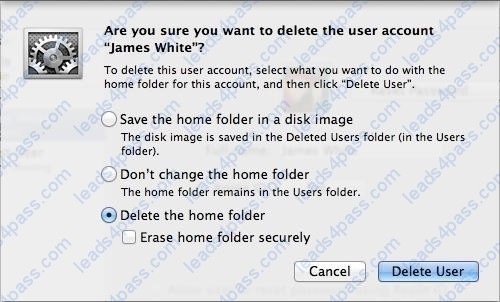
If you click Delete User in the dialog shown above, what will happen to James White's home folder?
A. It will be moved to the Trash.
B. "Deleted" will be appended to the home folder name, and it will be archived in Time Machine in a compressed and encrypted file.
C. "Deleted" will be appended to the home folder name, and its permissions will be changed to allow administrator user access only.
D. It will be deleted immediately, without being moved to the Trash.
When a user chooses Shut Down from the Apple menu, what process quits all of the user's open applications and tells the kernel to power down the computer?
A. init
B. launchd
C. loginwindow
D. kernel_task
Review the screenshots of a Mac computer's Network pane, and then answer the question below.
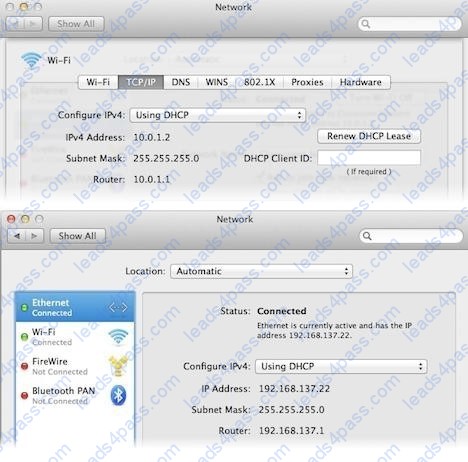
If a Mac with the network configuration shown above needs to initiate a connection to a server at address 17.20.8.9, which interface will it use to do so?
A. Neither interface: this computer cannot communicate with the server at 17.20.8.9.
B. Wi-Fi
C. Either interface may be used, based on automatic routing.
D. Ethernet
What's Auto Save? How can you identify an application that supports Auto Save?
A. Auto Save allows compatible OS X applications to automatically save changes to users' documents. A user just saves a document once, then never has to think about saving changes again. Applications that support Auto Save feature a Duplicate function in the File menu as opposed to a default Save As function.
B. The master password is used to reset local account passwords.
C. You can use the System Information application to easily scan all the appropriate application locations and return a list of installed applications.
D. Disk Utility is the primary application for creating and managing disk images.
You can enable printer sharing from Print and Scan or Sharing preferences. Note that Windows clients may need additional drivers to access the Mac computer's shared printers via the IPP protocol.
A. What are account attributes?
B. How can you limit the use of Location Services?
C. How do you share printers with other users?
D. How can you identify duplicate fonts?
Sandboxed applications are only allowed access to specific items. They're otherwise completely cut off from the rest of the system, so they can't cause harm. All Mac App Store applications are required to be sandboxed.
A. What are the advantages of application sandboxing?
B. What does the master password do?
C. What happens during system shutdown?
D. What are Safe Sleep and Power Nap?
Time Machine can back up to any Mac OS Extended volume or network shares hosted from Time Capsule or OS X Server.
A. What Wi-Fi authentication protocols are supported by OS X?
B. What backup destination disks does Time Machine support?
C. What application is used to manage keychain settings?
D. What's used to identify a Wi-Fi network?
The master password is used to reset local account passwords.
A. How can you identify duplicate fonts?
B. Where are application preferences stored?
C. What are the advantages of code signing?
D. What does the master password do?
What are some privacy and security concerns with the Spotlight service?
A. The Spotlight search service creates index databases of file system metadata so that it can perform normally time intensive searches nearly instantly. File system tags can be found in the Finder sidebar, Spotlight search, and any open or save document dialogs.
B. When fast user switching is enabled, all users are allowed to see other users' locally connected disks.
C. A user's home folder permissions can be reset from the Reset Password application on OS X Recovery.
D. Though Spotlight indexes file and folder permissions, it allows other users to search the contents of locally attached nonsystem volumes when ownership is ignored on those volumes.





All rights are reserved by
leads4pass.com. Any changes, copy or trademarks abuse will be
regarded as infringement.
leads4pass.com will reserve the right to pursue accountability.
Copyright © 2004-
2026 leads4pass.com.