
9L0-412 Online Practice Questions and Answers
Review the screenshot, and then answer the question below.
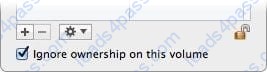
You connect an HFS+-formatted FireWire hard disk to a Mac, and configure it as shown in the screenshot. What will happen the next time a standard user attempts to mount the hard disk?
A. The disk will mount, and the user will be able to read, modify, and delete any file on the disk.
B. The user will be required to enter an administrator password to mount the disk; once the disk is mounted, the user will be able to read any file on the disk, but will be required to re- enter an administrator password to modify or delete files.
C. The disk will mount, and the user will be able to read any file on the disk; the user will be required to enter an administrator password to modify or delete files on the disk.
D. The user will be required to enter an administrator password to mount the disk; once the disk is mounted, the user will be able to read, modify, and delete any file on the disk.
Which of these is a recovery key storage location that FileVault 2 offers when you enable it?
A. Your iCloud account
B. The System Keychain
C. The OS X Recovery partition
D. An Apple server
You are configuring an OS X Mountain Lion computer that will be located in a public space. You want anyone to be able to log in and use Safari, but you do NOT want their Safari browser history to remain on the computer after users log out. Which action will let the computer function in the desired manner?
A. Enable the Guest account for login.
B. Create a managed account with Parental Controls.
C. Create a Sharing Only account.
D. Create a Guest account.
On a Mac running OS X Mountain Lion, how can you display a list of installed software updates?
A. Open System Information, click System Report, and then in the sidebar under Software, click Installations.
B. Open Software Update preferences and click Installed Software.
C. Open Installer, choose Show Files from the File menu, and then in the Files section under /var/log/, select install.log.
D. Open Software Update and click Receipts.
On your OS X Mountain Lion computer, you want the Finder to display filename extensions by default. How can you configure this setting from the Finder?
A. Choose Preferences from the Finder menu, click Advanced, and select the option "Show all filename extensions."
B. Control-click anywhere on the Desktop, select Preferences from the pop-up menu, click Advanced, and select the option "Show all filename extensions."
C. Choose Show View Options from the View menu, and select the option "Show all filename extensions."
D. Select any file icon, and choose Get Info from the File menu. In the Info window, click the disclosure triangle next to Name and Extension, deselect the option "Hide extension," and click Change All.
The function of journaling in the Mac OS Extended (Journaled) file system is to ________.
A. protect volume structure integrity in cases of unexpected shutdown
B. provide a backup of user files
C. provide support for resource forks, extended attributes, and metadata
D. provide support for Spotlight searches
You enable Stealth Mode on an OS X Mountain Lion computer's firewall. How does this affect the computer's behavior?
A. The Mac will not register any services that are offered via Bonjour.
B. The Mac will not allow outgoing connections for non-approved applications.
C. The Mac will not respond to incoming connection requests.
D. The Mac will not respond to diagnostic probes such as ping.
On an optional configuration step in the Setup Assistant in OS X Mountain Lion, pressing Command-Q lets you skip the step.
A. True
B. False
In OS X, Disk Utility can create file archives in which format?
A. zip
B. dmg
C. sitx
D. gzip
Review the screenshot from FileVault preferences, and then answer the question below.
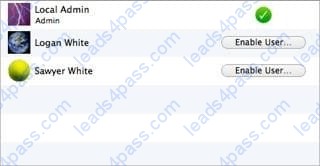
If you click Enable User for the Logan White account, what is the effect?
A. FileVault 2 is enabled immediately for the Logan White account, and FileVault begins encrypting the Logan White home folder.
B. You are prompted immediately to enter the login password for the Logan White account, after which, Logan White will be able to unlock and decrypt the system disk, and restart the computer.
C. You are prompted immediately to enter an administrator password, after which, the user of the Logan White account will be able to unlock and decrypt the system disk, and restart the computer.
D. At next login, the user of the Logan White account will be prompted to enter the login password, after which, the user will be able to unlock and decrypt the system disk, and restart the computer.





All rights are reserved by
leads4pass.com. Any changes, copy or trademarks abuse will be
regarded as infringement.
leads4pass.com will reserve the right to pursue accountability.
Copyright © 2004-
2026 leads4pass.com.