
9A0-351 Online Practice Questions and Answers
Click the Exhibit tab to see the exhibit.
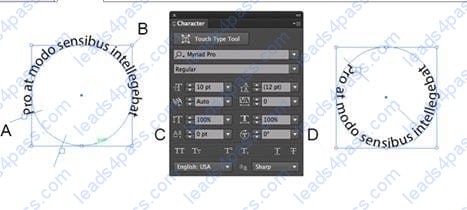
You are starting with the text shown at the left side of the exhibit. How should you edit it so that the text follows the inside of the circle as shown at the right side of the exhibit?
A. Adjust the value for D to move the text inside the circle.
B. Adjust the value for C to move the text inside the circle.
C. Drag bracket B toward the center of the circle.
D. Drag bracket A toward the center of the circle.
Click the Exhibit tab to see the exhibit.
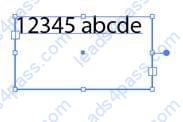
You created area type but the container is too wide. How should you make it narrower without distorting the type?
A. With the Type tool, drag the right side of the container.
B. With the Scale tool, drag the right side of the container.
C. With the Selection tool, drag the middle square handle on the right side of the container.
D. With the Selection tool, drag the round blue handle on the right side of the container.
You have built a color illustration. Before printing, you want to see how each ink color plate will appear, individually. Which technique should you use?
A. Use the Flattener Preview Panel
B. Choose View > Overprint Preview
C. Choose View > Proof Colors
D. Use the Separations Preview Panel
You apply a drop shadow to your object and notice it appears to be low resolution. What is the reason for this?
A. In the Flatten Transparency dialog box, the Low Resolution preset is selected
B. In the Flattener Preview panel, the Low Resolution preset is selected.
C. In the Document Setup dialog box, the Low Resolution transparency preset is selected.
D. In the Document Raster Effects Settings dialog box, Screen Resolution is selected.
How can you select a group of objects that are contained within another group (i.e., a nested group)?
A. Click on the group with the Selection tool
B. Alt+click (Windows) or Option+click (OS X) with the Selection tool
C. Click on the group with the Direct Selection tool
D. Alt+click (Windows) or Option+click (OS X) with the Direct Selection tool
You are drawing a shape with the Pen tool. As you are drawing you click and drag to add an anchor point with a direction line. You then realize you need to reposition the anchor point. Without releasing the mouse button, how can you reposition that anchor point while drawing?
A. Hold down Ctrl+Alt (Windows) or Cornrnand+Option (OS X) and reposition the anchor point.
B. Hold down the Shift key on the keyboard and reposition the anchor point.
C. Hold down the spacebar key on the keyboard and reposition the anchor point.
D. Continue dragging until the anchor point begins to move.
You are printing a document with multiple artboards. What will happen if "Ignore Artboards" is enabled?
A. Only the selected artboard will print.
B. None of the artboards will print.
C. All artboards will print on a single page.
D. Each art board will print on separate pages.
How would you adjust the color of selected artwork using a Color Group in your Swatches Panel?
A. Choose a Harmony Rule In the Color Guide panel.
B. Click the Color Group button in the Swatches panel.
C. Click the Edit or Apply Colors button in the Color Guide panel.
D. Choose Edit > Edit Colors > Adjust Color Balance.
You'd like to set numbers in type using old style proportional figures, and the font you're using contains those characters. Where do you select the Proportional Oldstyle option?
A. TheOpenType panel.
B. The Character panel.
C. The Glyphs panel.
D. The Find Font dialog box.
Click the Exhibit tab to see the exhibit.
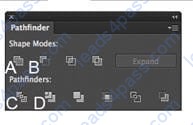
You've drawn a rectangle on the artboard, then you add multiple ovals on top of that rectangle. You want the ovals to "punch through" the rectangle. Which shape mode in the Pathfinder panel will achieve this result?
A. A
B. B
C. C
D. D





All rights are reserved by
leads4pass.com. Any changes, copy or trademarks abuse will be
regarded as infringement.
leads4pass.com will reserve the right to pursue accountability.
Copyright © 2004-
2026 leads4pass.com.