
3102 Online Practice Questions and Answers
Which two statements describe the purpose of a System Manager (SMGR) role? (Choose two.)
A. It provides access to any number of resources managed by SMGR.
B. It impacts the originating and terminating applications that can be sequenced for a user.
C. It is automatically held by users that have been added to any group containing that role.
D. It can be held by multiple administrators at the same time and a single administrator can have multiple roles enabling tight control of access.
Which two functionalities does the SIP firewall provide to protect Session Manager from SIP flood attack? (Choose two.)
A. Removing the suspected source
B. Rate Limiting
C. Blocking the Entity Link
D. Rate Blocking
Which statement expresses the relationship between users, roles, and groups?
A. Roles grant permissions. Users are not directly assigned roles but inherit them through belonging to groups.
B. A group is a name for a collection of roles and each role is assigned its own administrator user.
C. Users can belong to groups for easy management and can be assigned roles which grant them access rights.
D. Groups and roles directly correspond to sections of the SMGR Web Console navigation pane and, unless a user belongs to a specific role group, they cannot access the corresponding management screens.
A new feature server has been deployed in the network. The feature server must be applied to all calls made and received by the user. A technician has been asked to make the necessary arrangements. After adding a SIP Entity and Entity Link, which sequence describes the next steps that should be taken?
A. Navigate to the user's User Profile and open the Session Manager Profile. From the Originating Application Sequence drop down list, select the new Application Sequence. Repeat for the Terminating Application Sequence drop down list. Mark them both as being Mandatory.
B. Define the new feature as an Application. Add the Application to an Application Sequence. Mark the Application Sequence as Mandatory. Add the Application Sequence to user's User Profile.
C. Create a new Application Sequence or edit one that already exists. Add details of the new feature to the Application Sequence. Mark the new feature as being mandatory. Apply the Application Sequence to user's Originating and Terminating Application Sequences In their Session Manager Profile.
D. Define a new Application that details the new feature. Add the new Application to an Application Sequence. Mark the new feature as being mandatory. Apply the Application Sequence to both Originating and Terminating Application Sequences in the user's Session Manager Profile.
How is call Admission Control enabled for Session Manager Release 6.1?
A. Call Admission Control is enabled in the SIP Entity by specifying a value for Managed Bandwidth.
B. Call Admission Control is enabled on the Session Manager instance by specifying a value for Managed Bandwidth.
C. Call Admission Control is enabled on a Location by specifying a value for Managed Bandwidth.
D. Call Admission Control is enabled on an Entity Link specifying a value for Managed Bandwidth on the Locations screen in Session Manager.
An organization is adding four Session Managers installed to its network. The installation scripts for all four session Manager Instances have completed and all services have been started but none have yet been configured with Session Manager. The technician's task is to use System Manager to set up the four Session Managers in an in (n-1)/n redundant arrangement ready for adding users to redundant Session Manager Pairs. Which sequence best describes the tasks that are to be performed?
A. Ensure that a Location and SIP Domain suitable for each Session Manager is defined. Add each Session Manager as a SIP Entity. Associate each Session Manager SIP Entity with a Session Manager instance. Set up Entity Links between each Session Manager.
B. Define each Session Manager as a SIP Entity. Establish relationships between them by defining Routing Policies based on their respective locations. Add appropriate Adaptations to each Session Manager.
C. Define each Session Manager as a SIP Entity by creating Entity Links. Create Communication Profiles for each Session Manager.
D. Add each Session Manager as Routing Agents. Establish links between them by adding Locations. Mark each Session Manager as being 'active' or 'standby'.
While reviewing the Event Logs on the Session Manager, you notice an ALERT message: (OP_AFW17504) "SIP firewall white list configuration failed, retaining existing configuration." Which action should you perform when you see this alert?
A. Access the SIP firewall white list configuration and verify that the configuration is correct.
B. Access the SIP firewall configuration and change the RULE log type to none to not have these ALERTS appear in the EVENT logs.
C. Access the SIP firewall configuration and Load the ASM Default Configuration.
D. Disregard these messages as they are sent to the Event Logs and do not generate alarms.
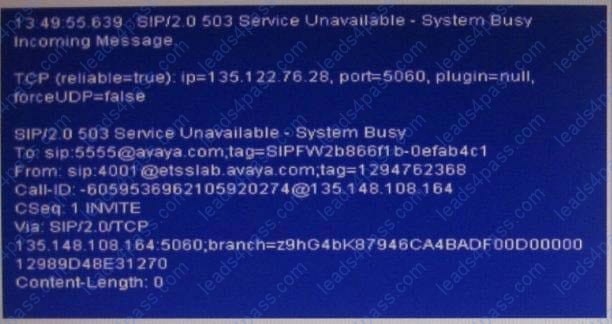
Session Manager (SM) has been successfully installed. You have configured the Session Manager instance and it has passed all tests. However, when you attempt to test a call, it fails and you receive a 503 service Unavailable - System Busy response. What is a cause for the call to fail and how can it be fixed?
A. There is a non-bidirectional FQDN resolution between SM and System Manager (SMGR). Verify that either the SMGR or the SM has updated DNS records or the hostnames are added to the /etc/host file on the SM and the SMGR.
B. The Security Module service is not running. Verify the status of the Security Module and reset it.
C. The Session Manager is not accepting new requests. Verify the System Administration Management State is set to Accept New Service.
D. The SIP user attempting to make the call has not registered properly with the Session manager. Verify the communication profile of the user has Session Manager Profile defined.
E. The Session manager is not accepting new requests. Verify the system Administrative Service state is set to Accept New Service.
What three pieces of information are required to be entered for the Session Manager to be installed and synchronized with System Manager? (Choose three.)
A. System Manager IP Address
B. Session Manager Security Module Address
C. System Manager FQDN
D. DNS Server Address
E. Enrollment Password
A company has multi-location voice network. They are introducing Session Manager to make their routing centralized. They have Avaya Communication Manager at their main location. For the SIP telephone on Session Manager to call the H.323 telephones on communication Manager, which adaption module may be used in their configuration?
A. ChangeDomain
B. DigitConversionAdapter
C. NumberAdaptation
D. DomainChangeAdapter
E. DefaultAdapter





All rights are reserved by
leads4pass.com. Any changes, copy or trademarks abuse will be
regarded as infringement.
leads4pass.com will reserve the right to pursue accountability.
Copyright © 2004-
2026 leads4pass.com.