
1Z0-151 Online Practice Questions and Answers
The Credit_Rating item in the Customers block of an Order Entry form must be restricted to three possible values: Good, Poor, or Null (the latter value indicates that the credit rating has not been determined). Order entry clerks must be able to update this item to any of the preceding three values.
You want to change the item to a check box labeled "Credit Risk" that should be selected if the customer has poor credit, the check box should not be selected if the customer's credit rating is good or undetermined.
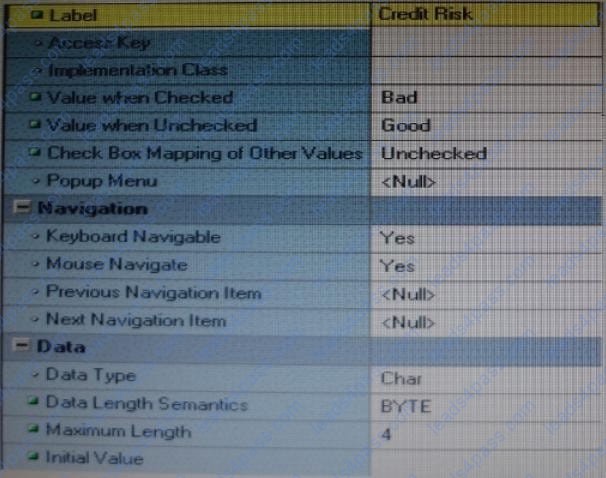
You change the item type to Checkbox, set other properties as shown in the Exhibit, and then run your form and insert three records: two with good credit and the check box deselected, and one with poor credit and the check box selected. You commit the data and query the records, with the following result set:
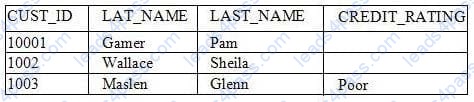
The first two records show an undetermined credit rating, although your intention was to set the value to Good for these customers. What change must you make in the properties of the Credit_Ratinq item to enable values of Good, Poor, and Null to be entered?
A. Change the initial Value property to Good.
B. Change the Check Box Mapping of Other Values property to Not Allowed.
C. Change the initial Value property to Good and the Value When Unchecked property to Null.
D. Change the initial Value property to Good and the Chock Box Mapping of Other Valued property to Null.
E. Change the initial Value property to Good and the Check Box Mapping of Other Values property to checked.
F. Change the item type. It is not appropriate to use a check box to enable entry and update of more than two values in an item.
The Orders form has four blocks. The Orders and Order_items block are on the CV_Order content canvas;
the inventories block items are on the CV_inventories content canvas; and Control block buttons are on the
CV_Buttons toolbar canvas. All buttons have mouse Navigate set to No.
The Order_Items block is a detail of Orders. The inventories block is a detail of Order_Items, showing the
stock of the selected product.
There is a button in the Control block with a When-Button-Pressed trigger:
IF GET_CANVAS_PROPERTY(:SYSTEM.cursor_item, item_canvas) = 'CV_ORDER' THEN GO_BLOCK
('inventories')
ELSE
GO_BLOCK('orders');
END IF;
When you run the form and click the button, navigation does not occur, and the form displays the runtime
error "FRM-41053: Cannot find Canvas: invalid ID." What should you do to correct this problem?
A. Change the sequence of blocks in the Object Navigator
B. Chang the Mouse Navigator property of the button to yes
C. in the first line of code, change the built-in to GET_ITEM_PROPERTY
D. in the first line of code, change the system variable to: SYSTEM.CURSOR_CANVAS.
E. in the first line of code, change the CV_ORDER to lowercase
F. Chang the argument to the GO_BLOCK built-ins to uppercase
Which statement is always true about using OPEN_FORM to open multiple forms in an application?
A. Database transactions are always continued across forms.
B. Code is always shared among forms.
C. A calling form must pass data to a called form.
D. A global record group is always created.
E. Only A and B are true.
F. Only B and C are true.
G. Only C and D are true.
H. None of the statements above are true.
The Employees database table contains more columns than can be displayed at one time in a form. You create a data block that uses all the columns. How can you enable users to interact with all the items and switch between them without scrolling or closing anything?
A. Define multiple content canvases and display them in multiple modeless windows.
B. Define multiple content canvases and display them in the same modeless window.
C. Define multiple content canvases and display them in multiple modal windows.
D. Define multiple content canvases; display one in a modeless window and the others in modal windows.
E. This is not possible because items from a single block must be displayed on the same canvas and window.
View the Exhibit.
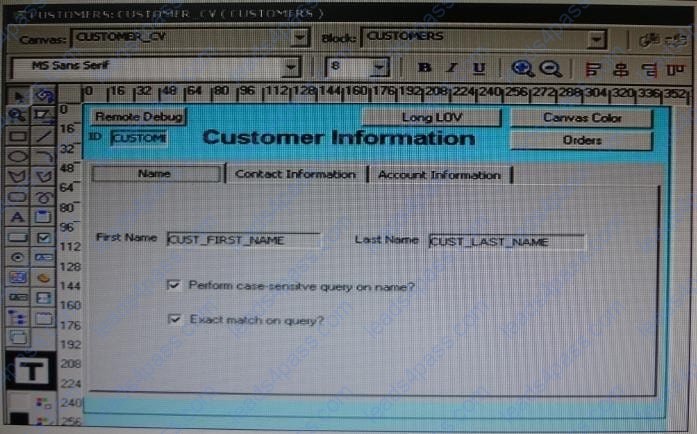
The DBA has added a 30-character Cust_Middle_Name field to the Customers table and wants you to add it to the Customers form. It should be on the same line as the as the first and last names, which are on the Name tab page of the Tab_Customer canvas that appears in the Layout Editor as shown in the Exhibit. The Tab_Customer tabbed canvas is displayed on the Customer_CV content canvas as shown in the Exhibit.
What must you do to accommodate the additional label and text item and to display the middle name?
A. increase the Width property of the Customer_CV canvas only.
B. increase the Width property of the Tab_Customer canvas only.
C. increase the Width properties of only the Customer_CV canvas and the Tab_Customer canvas.
D. increase the Width properties of the Customer_CV canvas, the Tab_Customer canvas, and the name tab page.
Immediately after creating a button in the Layout Editor, what is true about the button?
A. It is an iconic button.
B. It has no functionality.
C. It is not mouse navigable.
D. It is not keyboard navigable.
E. It is in the control block by default.
F. It is not enabled.
The Orders form has three blocks: Orders, Orders_Items, and inventories. It also has a button labeled Next
Block with a When-Pressed trigger.
IF :SYSTEM.cursor_block = 'orders' THEN
GO_BLOCK('order_items');
ELSIF :SYSTEM.cursor_block = 'order_items' THEN
GO_BLOCK('inventories');
ELSIF :SYSTEM.cursor_block = 'inventories' THEN
GO_BLOCK ('orders');
END IF;
The button is not functioning correctly; it does not cause navigation to occur. What must you do to fix the
issue?
A. Change all occurrences of :SYSTEM.cursor_block to :SYSTEM.trigger_block.
B. Use system variables in the GO_BLOCK statements.
C. Change the block names to uppercase in the GO_BLOCK statements.
D. Change the block names to uppercase in the condition (IF ...THEN) statements.
E. instead of naming the block to navigate to, replace the GO_BLOCK built-in with NEXT_BLOCK
F. Move the code to a PL/SQL program unit.
View the Exhibits.
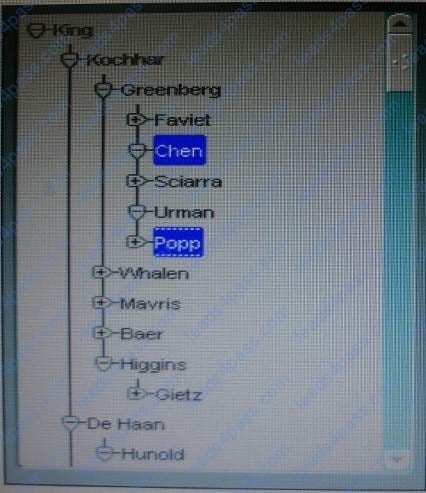
The hierarchical tree shown at run time in Exhibit 1 is populated programmatically. Default hierarchical tree properties are shown in Exhibit?
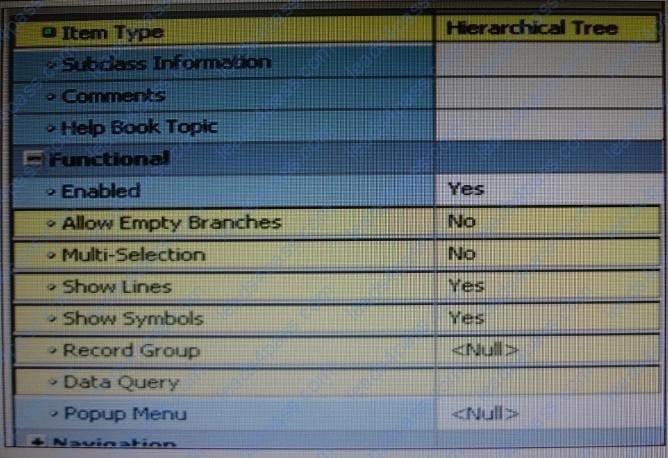
Which properties of the hierarchical tree shown in Exhibit 1 have been changed from the default?
A. Allow Empty Branches and Multi Selection only
B. Allow Empty Branches and Show Symbols only
C. Multi Selection and Show Symbols only
D. Allow Empty Branches, Multi Selection, and Show Symbols
View the Exhibit to examine the form.
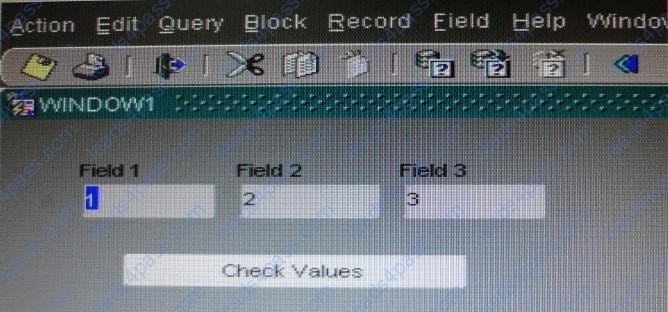
The text items (Field1, Field2, and Field3) and the button (Check_Values) are in the CONTROL block. The Mouse Navigate property of the button has been set to No.
The following code as been written in a When-Button-Pressed trigger on the Check_Values button:
MESSAGE(:field1| | ' - ' | | :SYSTEM.cursor_item | | ' - ' | | :SYSTEM.trigger_item);
With the focus in Field1 and the values 1, 2, and 3 in the text items, what message will be displayed when the button is clicked.
A. -4
B. 1 -2 -3
C. 1 field1 Check Values
D. Field1 -1 Check Values
E. 1 CONTROL.FIELD1 CONTROL.FIELD1
F. 1 CONTROL.FIELD1 CONTROL.CHECK_VALUES
G. :field1 - :SYSTEM.cursor_item - :SYSTEM.trigger_item
You have just created radio buttons labeled Outstanding, Exceeds, Meets, and Does not Meet for the employee appraisal rating, but you accidentally created it on the Employee_Training canvas rather than on the Employee_Appraisal canvas. How can you move them to the appropriate canvas?
A. Open the Layout Editor for both canvases; drag the radio buttons from Employee_Training canvas to the Employee_Appraisal canvas.
B. Drag the radio button nodes from the Object Navigator to the Employee Appraisal canvas in the Layout Editor.
C. Drag the radio group node from the Object Navigator to the Employee__Appraisal canvas in the Layout Editor.
D. Set the Canvas property for the radio buttons to Employee_Appraisal
E. Set the Canvas property for the radio group to Employee_Appraisal.
F. You cannot move existing radio buttons to another canvas; you will need to delete them from the Employee_Training canvas and create new ones on the Employee_Appraisal canvas.





All rights are reserved by
leads4pass.com. Any changes, copy or trademarks abuse will be
regarded as infringement.
leads4pass.com will reserve the right to pursue accountability.
Copyright © 2004-
2026 leads4pass.com.