
156-915.77 Online Practice Questions and Answers
You are the Security Administrator for ABC-Corp. A Check Point Firewall is installed and in use on GAiA. You are concerned that the system might not be retaining your entries for the interfaces and routing configuration. You would like to verify your entries in the corresponding file(s) on GAiA. Where can you view them? Give the BEST answer.
A. /etc/sysconfig/netconf.C
B. /etc/conf/route.C
C. /etc/sysconfig/network-scripts/ifcfg-ethx
D. /etc/sysconfig/network
The third-shift Administrator was updating Security Management Server access settings in Global Properties and testing. He managed to lock himself out of his account. How can you unlock this account?
A. Type fwm unlock_admin from the Security Management Server command line.
B. Type fwm unlock_admin -u from the Security Gateway command line.
C. Type fwm lock_admin -u
D. Delete the file admin.lock in the Security Management Server directory $FWDIR/tmp/.
Your perimeter Security Gateway's external IP is 200.200.200.3. Your network diagram shows:
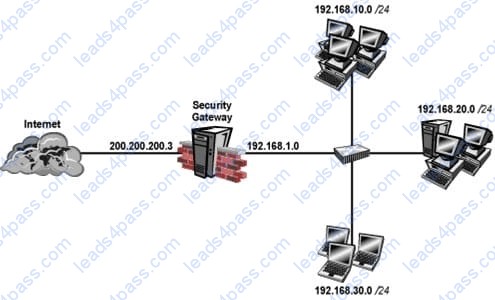
Required: Allow only network 192.168.10.0 and 192.168.20.0 to go out to the Internet, using
200.200.200.5.
The local network 192.168.1.0/24 needs to use 200.200.200.3 to go out to the Internet.
Assuming you enable all the settings in the NAT page of Global Properties, how could you achieve these requirements?
A. Create network objects for 192.168.10.0/24 and 192.168.20.0/24. Enable Hide NAT on both network objects, using 200.200.200.5 as hiding IP address. Add an ARP entry for 200.200.200.3 for the MAC address of 200.200.200.5.
B. Create an Address Range object, starting from 192.168.10.1 to 192.168.20.254. Enable Hide NAT on the NAT page of the address range object. Enter Hiding IP address 200.200.200.5. Add an ARP entry for 200.200.200.5 for the MAC address of 200.200.200.3.
C. Create a network object 192.168.0.0/16. Enable Hide NAT on the NAT page. Enter 200.200.200.5 as the hiding IP address. Add an ARP entry for 200.200.200.5 for the MAC address of 200.200.200.3.
D. Create two network objects: 192.168.10.0/24 and 192.168.20.0/24. Add the two network objects to a group object. Create a manual NAT rule like the following: Original source - group object; Destination any; Service - any; Translated source - 200.200.200.5; Destination - original; Service - original.
Your users are defined in a Windows 2008 R2 Active Directory server. You must add LDAP users to a Client Authentication rule. Which kind of user group do you need in the Client Authentication rule in R77?
A. External-user group
B. LDAP group
C. A group with a generic user
D. All Users
Which of the following authentication methods can be configured in the Identity Awareness setup wizard?
A. Check Point Password
B. TACACS
C. LDAP
D. Windows password
Fill in the blank. The command that typically generates the firewall application, operating system, and hardware specific drivers is _________ .
A. snapshot
Which statements about Management HA are correct? 1) Primary SmartCenter describes first installed SmartCenter 2) Active SmartCenter is always used to administrate with SmartConsole 3) Active SmartCenter describes first installed SmartCenter 4) Primary SmartCenter is always used to administrate with SmartConsole
A. 1 and 4
B. 2 and 3
C. 1 and 2
D. 3 and 4
Type the command and syntax to view critical devices on a cluster member in a ClusterXL environment.
A. cphaprob -ia list
Fill in the blank. To verify SecureXL statistics, you would use the command ________ .
A. fwaccel stats
SmartReporter reports can be used to analyze data from a penetration-testing regimen in all of the following examples, EXCEPT:
A. Analyzing traffic patterns against public resources.
B. Possible worm/malware activity.
C. Analyzing access attempts via social-engineering.
D. Tracking attempted port scans.





All rights are reserved by
leads4pass.com. Any changes, copy or trademarks abuse will be
regarded as infringement.
leads4pass.com will reserve the right to pursue accountability.
Copyright © 2004-
2026 leads4pass.com.